Try it without installing anything
Every example inventory below is the real netviz render -f html output: switch layers, filter by VLAN, hover a node for its interfaces and addresses. Nothing is fetched and nothing is installed.
netviz

Declare your network — switches, routers, hubs, computers, servers, cables, adapters, tunnels and patch panels — in a folder tree of YAML files, then render it as a network graph.
netviz reads the tree, checks that the documents agree with each other, and draws the
result as SVG, PNG, PDF, Graphviz DOT, Mermaid or JSON. It can also open the whole thing
in a browser — netviz web — where the YAML is edited on one side, drawn on the other,
and every node and link answers a hover with its interfaces, addresses, VLANs and cabling.
That page is driveable entirely from the keyboard, Ctrl-K for the command palette and ?
for the list; see the bindings.
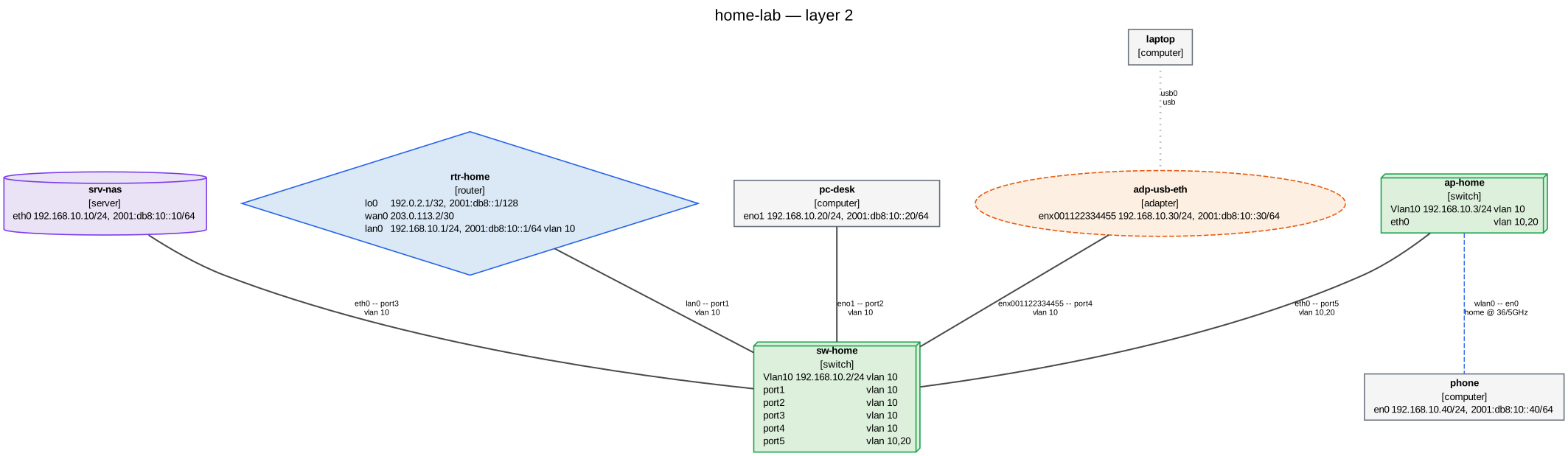
Produced from examples/home-lab with
netviz -i examples/home-lab render --layer l2 --title "home-lab — layer 2" -f svg -o docs/images/home-lab.svg.
Nothing to install to look: every example inventory in this repository is published as
a live diagram at https://blechschmidt.github.io/netviz/demo/ — switch layers,
filter by VLAN, hover a node for its interfaces and addresses. Those pages are the output
of netviz render -f html, not a demo built to look like it.
Status: early development (0.0.3). The schema, loader, validator, renderers and CLI work end to end; the schema may still change before 1.0. See §12 of the specification.
Why
Network documentation rots because the diagram and the truth live in different places. The diagram is a drawing: nothing checks it, nothing regenerates it, and the day someone re-patches a link it starts lying.
netviz puts the source of truth in reviewable, diffable YAML next to the rest of your infrastructure code, and generates the picture on demand. Because the files are structured rather than drawn, they can be checked: a cable that names a port which no longer exists is an error, not a line that happens to end in the wrong place.
Field names and value spaces follow RFC 8343 (ietf-interfaces), RFC 8344 (ietf-ip) and
the IEEE 802.1Q bridge model, so an inventory stays comparable with what a device actually
reports — see docs/yang-mapping.md.
Installation
netviz needs Python 3.10 or newer.
pip install netviz
pipx install netviz        # or, to keep it out of your project environments
uv tool install netviz     # same idea, faster
Check what you got — the version, and the Python and Graphviz it found:
netviz --version
netviz version --json      # the same report, for a bug report
From a checkout instead, when you are working on netviz itself or want an unreleased
change. netviz develops with uv: uv.lock is committed,
so this installs the exact versions every CI job runs against rather than whatever
resolves today.
uv sync                     # runtime dependencies, from uv.lock
uv sync --extra dev         # including the development tooling
uv run netviz --version     # or activate .venv and drop the prefix
The svg, png, pdf and html formats are produced by running the Graphviz dot
binary, which is a system package rather than a Python one:
sudo apt install graphviz        # Debian / Ubuntu
sudo dnf install graphviz        # Fedora / RHEL
brew install graphviz            # macOS
choco install graphviz           # Windows
Check it with dot -V. The dot, mermaid and json formats are written by netviz
itself and need none of that, so if you only want DOT to feed into another tool you can
skip the install.
Linux, macOS and Windows are all tested in CI. On Windows and macOS Graphviz is often
installed without landing on PATH; netviz looks in the usual install locations too,
and NETVIZ_DOT names the binary outright when that is not enough. Full instructions —
including the PowerShell completion script and the .gitattributes an inventory kept in
Git on Windows wants — are in
docs/getting-started.md.
Or install nothing at all. The published image already has Graphviz in it, and runs the CLI, the live preview and the browser editor:
docker run --rm -v "$PWD:/inventory:ro" ghcr.io/blechschmidt/netviz:main validate
main is the tip of the default branch, rebuilt on every push. No version has been
released yet, so there is no latest to pull — see docs/docker.md for
the full tag list, which also covers docker-compose.yml for the two
servers.
Quickstart
Five commands. init writes a small, valid inventory — devices, cables and a suite of
assertions about them; edit it into your own network.
netviz init my-network && cd my-network
$EDITOR devices/sw-office.yaml          # your switches, routers, hosts
netviz validate                       # do the documents agree with each other?
netviz test                           # do they still say what the network is for?
netviz render -f svg -o network.svg   # draw it
The tree it writes looks like this — the folder a document sits in becomes its namespace, and nothing else about the layout carries meaning:
my-network/
├── netviz.toml          # optional: default flags for this inventory
├── schema/                # JSON Schema, wired into your editor
├── devices/
│   ├── rtr-gw.yaml        # kind: router
│   ├── sw-office.yaml     # kind: switch
│   └── pc-alice.yaml      # kind: computer
└── cables/
    └── links.yaml         # which port is patched into which port
A device is a name, a kind and its interfaces; a cable is two endpoints:
apiVersion: netviz.dev/v1alpha1
kind: switch
metadata:
  name: sw-office
spec:
  interfaces:
    - name: port1
      type: ethernet
      vlan: { mode: access, vid: 10 }
    - name: port2
      type: ethernet
      vlan: { mode: access, vid: 10 }
That inventory is checked in as examples/quickstart, so the
following really is what it prints:
$ netviz validate
no problems found
$ netviz list devices
NAME               KIND      PORTS  ADDRESS           VLANS
-----------------  --------  -----  ----------------  -----
devices/pc-alice   computer      1  192.168.10.20/24  10
devices/rtr-gw     router        2  203.0.113.2/30    10
devices/sw-office  switch        2  -                 10
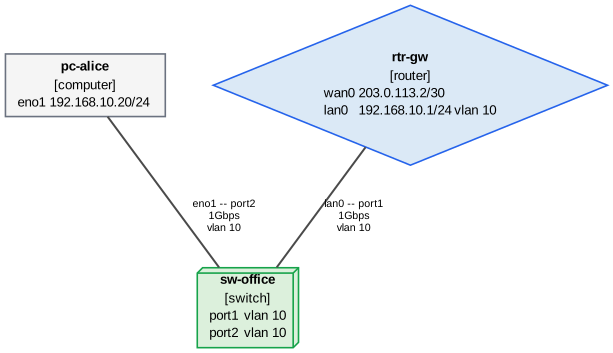
Point a cable at a port that does not exist and validate says so, with the file, the
line and a rule id — which is the whole point. The step-by-step version of this, built by
hand and explained line by line, is
docs/getting-started.md.
Already have a network? netviz import builds the first
inventory from output you collect on the devices themselves — LLDP neighbours, ip -j addr show, or the cabling list you already keep — so it starts a diff away from correct
instead of a weekend of typing:
lldpctl -f json > collected/"$(hostname -s)".lldp.json    # on each device
netviz import -o my-network collected/*.json
Once the tree exists, netviz drift reads the same captures
the other way round — the inventory becomes an assertion about the network, and the
command reports where reality disagrees. What a capture cannot see is reported as
unobserved rather than as a deletion, so a partial capture never reads as the network
having been dismantled, and --fail-on drift makes it a gate for a nightly job.
The commands
netviz [GLOBAL OPTIONS] COMMAND [OPTIONS] [ARGS]. The inventory is named once, with
the global -i/--inventory, and defaults to the current directory. Data goes to stdout
and commentary to stderr, so netviz render -f json | jq and netviz validate > report.txt both do what they look like they do.
| Command | What it does | Reference |
|---|---|---|
netviz init |
Scaffold a new inventory, ready to validate and render. | init.md |
netviz import captures |
Build a first inventory from output captured on live devices. | import.md |
netviz import drawio |
Bring an edited draw.io diagram back as a reviewable changeset. | import.md |
netviz drift |
Compare a live network against the declared inventory. | drift.md |
netviz validate |
Check the inventory; the gate for CI and pre-commit. | validate.md |
netviz test |
Grade the assertions the inventory declares about itself. | test.md |
netviz fmt |
Rewrite inventory YAML into the canonical form. | fmt.md |
netviz edit set |
Set a field on an element, in place, comments and all. | edit.md |
netviz edit unset |
Remove a field from an element. | edit.md |
netviz edit create |
Declare a new element and place its document. | edit.md |
netviz edit copy |
Copy an element or a whole namespace, links and all. | edit.md |
netviz edit duplicate |
Copy an element into the namespace it is already in. | edit.md |
netviz edit delete |
Remove an element, and what cannot survive it. | edit.md |
netviz edit rename |
Rename an element and every reference to it. | edit.md |
netviz edit move |
Move an element's document to another file. | edit.md |
netviz edit connect |
Cable two interfaces together. | edit.md |
netviz edit disconnect |
Remove a cable. | edit.md |
netviz edit add-interface |
Add an interface to an element. | edit.md |
netviz edit remove-interface |
Remove an interface from an element. | edit.md |
netviz edit apply |
Apply operations given as JSON; the programmatic face. | edit.md |
netviz plan |
Diff two inventory states into a reviewable changeset. | plan.md |
netviz diff |
Draw the difference between two inventory states as one diagram. | diff.md |
netviz review |
Write a change up as one pull-request review: changeset, diagram, new findings. | review.md |
netviz apply |
Execute a plan against the inventory files. | apply.md |
netviz converge plan |
Turn drift into an ordered, per-device remediation plan. | converge.md |
netviz log |
List the commits that changed the inventory, and what each one changed. | log.md |
netviz render |
Draw the graph as SVG, PNG, PDF, DOT, Mermaid, JSON or HTML. | render.md |
netviz layout |
Store the diagram's arrangement, so a hand-placed node stays put. | layout.md |
netviz watch |
Re-render on every save, optionally serving the result. | watch.md |
netviz web |
Edit the YAML and see the diagram side by side in a browser. | web.md |
netviz lsp |
Serve completion, diagnostics and rename to an editor over LSP. | lsp.md |
netviz path |
Trace how two elements reach each other, hop by hop. | path.md |
netviz impact |
Simulate a failure: blast radius, single points of failure, promises. | impact.md |
netviz list |
Tabulate devices, cables, tunnels, VLANs, BSSs or subnets. | list.md |
netviz query |
Ask a question about the network, in either of two query languages. | query.md |
netviz ipam |
Report utilisation, free space, overlaps and aggregates. | ipam.md |
netviz export |
Emit hosts files, DNS zones, Ansible, Prometheus, cable lists. | export.md |
netviz ansible path |
Print the collections path holding the shipped Ansible collection. | ansible.md |
netviz ansible install |
Copy that collection into a control node's collections path. | ansible.md |
netviz ansible inventory |
Print the dynamic inventory the plugin builds, queries and all. | ansible.md |
netviz report |
Write the as-built documentation: a page per site and per device. | report.md |
netviz show |
Print one element as it was resolved, expansions included. | show.md |
netviz rules |
List the validation rules and their ids. | rules.md |
netviz schema |
Write the JSON Schema for editor completion. | schema.md |
netviz config show |
Show the resolved settings and where each value came from. | config.md |
netviz cache info |
Report where the parse cache is and what is in it. | cache.md |
netviz cache clear |
Delete this inventory's cached documents. | cache.md |
netviz completion |
Print the shell completion script. | completion.md |
netviz version |
Report the netviz, Python and Graphviz versions in use. | version.md |
Every flag of every command, the global options and the exit codes:
docs/commands/. Those tables are generated from the CLI
itself and checked by the test suite, so they cannot drift from the code.
One inventory, several questions
The files describe the network once; each command asks something different of them.
| You want to know | Ask |
|---|---|
| does the documentation contradict itself? | netviz validate |
| does the network still do what we built it to do? | netviz test |
| what does the physical topology look like? what does VLAN 10 reach? which subnets exist? | netviz render --layer l1|l2|l3 |
| what runs inside which tunnel? | netviz render --layer overlay |
| which SSID is on which channel, in which VLAN? | netviz list bss |
| what is in rack 3, and at which units? | netviz render --layer rack |
| how does this host reach that one, hop by hop? | netviz path |
| how do I move a switch on the diagram and have it stay there? | netviz layout |
| how full is that /24, and where is the next free /28? | netviz ipam |
what should /etc/hosts, the DNS zone, the Ansible inventory, the pull list or the routing script say? |
netviz export |
| what should this device's netplan, systemd-networkd, ifupdown, FRR, nftables or WireGuard configuration say? | netviz export netplan |
| how do I run Ansible against this, and query it from my own template? | the netviz.netviz collection |
| can I hand the diagram to somebody who only has draw.io, and take their edits back? | netviz export drawio |
| what do I hand over as the as-built documentation? | netviz report, and an example of what it writes |
| what did that template and that interface range actually expand to? | netviz show |
Two of them are worth seeing. Nothing in the YAML declares a subnet: the layer-3 view and
list subnets both derive the prefixes from the addresses the interfaces carry, which is
why they cannot disagree with the configuration,
$ netviz -i examples/home-lab list subnets
SUBNET            IP  ADDRESSES  ELEMENTS  VLANS
----------------  --  ---------  --------  -----
192.0.2.1/32       4          1         1  -
192.168.10.0/24    4          7         7  10
203.0.113.0/30     4          1         1  -
2001:db8::1/128    6          1         1  -
2001:db8:10::/64   6          5         5  10
and netviz path traces the route two hosts in different sites actually take, naming
the ingress and egress port at every hop:
$ netviz -i examples/campus path pc-north-01 pc-south-01
sites/north/hosts/pc-north-01 -> sites/south/hosts/pc-south-01: 2 paths
  source       sites/north/hosts/pc-north-01  [computer]
  destination  sites/south/hosts/pc-south-01  [computer]
  layer        3, routed (ipv4)
  showing      the shortest; pass --all for the rest
  note         no layer-2 path: the two elements are in no common broadcast domain, so the trace looked for a routed one
...
Where to go next
docs/README.md is the index, with an "if you want to X, read Y" table
over the whole set. The pages a new reader wants first:
| Page | What it answers |
|---|---|
docs/getting-started.md |
Install it, build a three-device inventory by hand, validate, render, interrogate. Ends with the editor wiring. |
docs/inventory-layout.md |
How to organise the files: namespaces, references, templates, interface ranges, and a layout for a multi-site estate. |
docs/rendering.md |
The nine layers, the filters, namespace collapsing, link bundling, icon themes, stored arrangements, and what each output format is for. |
docs/validation.md |
What the checks are, what a finding means, and the four ways to say "not here". |
docs/schema-reference.md |
Every field of every kind, with its type, default and YANG counterpart. |
docs/schema.md |
The normative specification, if you want the reasoning as well as the rules. |
docs/ci.md |
Making a pull request fail when the inventory stops adding up. |
docs/configuration.md |
netviz.toml, so you type the flags once instead of every time. |
docs/lsp.md |
netviz lsp in VS Code, Neovim, Helix and Emacs: diagnostics, completion, hover, rename and quick fixes on the YAML you are typing. |
docs/docker.md |
The image and the compose file: the CLI, the preview and the editor in a container. |
Examples
Five complete, self-consistent inventories live under examples/ —
from the three-device quickstart to a 22-device campus with nested namespaces, a
five-tunnel overlay with VXLAN inside IPsec, and a patch room with two racks of structured
cabling. All of them validate clean with no suppressions, and the test suite renders them
on every commit, so they stay executable rather than aspirational.
$ netviz -i examples/patch-room validate
no problems found
As a library
Everything the CLI does is available from Python: load_tree reads a folder into an
Inventory, validate returns findings, build_graph resolves the topology, and the
renderers are pure functions of the graph. See
Using it as a library.
Contributing
CONTRIBUTING.md has the dev setup and the gates (ruff, ruff format,
mypy, pytest with a coverage floor), plus recipes for adding a validation rule or a
renderer. docs/architecture.md is the ten-minute orientation:
the pipeline is load_tree → validate → build_graph → filter/aggregate →
renderers, and each stage's invariants are written down.