Tracing reachability with netviz path
An inventory that knows every cable, every VLAN and every address already knows the answer to the question a network engineer actually asks:
How does A reach B, and what does the traffic cross on the way?
netviz path SRC DST asks it. The answer is hop by hop — element, ingress
interface, egress interface, the link crossed with its medium and rate, and the
VLAN or the subnet in force — plus -F json for tooling and --highlight for a
picture.
It is a trace over the declared topology, not over the running network. Nothing is pinged and no device is contacted. That is the point: it tells you what your documentation says should happen, which is exactly the thing to compare against what does.
netviz path [OPTIONS] SRC DST
Contents
- Naming the two ends
- How the trace works
- Worked examples
- Several paths, and none
- Drawing the answer:
--highlight - JSON output
- Options
- Modelling notes and limits
Naming the two ends
SRC and DST each accept three spellings, and which one you meant is decided
by the shape of the argument rather than by a flag.
| Spelling | Example | What it pins |
|---|---|---|
| An IP address | 10.1.10.51 |
The element, the interface and the address. A prefix length is accepted and ignored, so you can paste straight out of ip addr. |
An element:interface selector |
sw-north-acc-01:GigabitEthernet1/0/1 |
The element and the port. The trace must leave (or arrive) by that port — this is how you tell a redundant pair apart. |
| An element name | pc-north-01, sites/north/hosts/pc-north-01 |
The element. Any of its ports may be used. |
They cannot collide: 10.1.10.51 is not a legal metadata.name
(docs/schema.md §2), and : occurs in neither a fully-qualified
name (whose separator is /) nor an interface name — so the first colon is
unambiguously the separator, and GigabitEthernet1/0/1 survives intact.
An address is usually the right spelling, because an address is what a ticket, a log line or a packet capture actually carries.
Every failure names what it could have meant instead:
$ netviz -i examples/campus path pc-north-01 pc-north-99
...
Error: Invalid value for 'SRC' / 'DST': no element named 'pc-north-99' in this inventory (destination argument). Run 'netviz list devices' to see what is declared.
$ netviz -i examples/home-lab path pc-desk:eth9 srv-nas
...
Error: Invalid value for 'SRC' / 'DST': 'hosts/pc-desk' has no interface 'eth9' (source argument). It has: lo, eno1, wlp1s0.
An address configured on two interfaces is refused rather than guessed at — that
is the situation E004 and
W106 exist
to report, and a trace is not the place to pick a winner. Loopback and
link-local addresses are not searched at all: every host declares 127.0.0.1,
so accepting it would match the whole inventory and mean nothing.
How the trace works
The trace is layer-aware, and it tries the layers in the order traffic does.
Layer 2: the physical walk
First it walks the physical topology — cables, adapter attachments and layer-2 tunnels — from the source. What makes this a layer-2 walk rather than a connectivity walk is that an element only relays a frame when its kind says it does:
| Kind | At layer 2 |
|---|---|
hub |
A repeater (docs/schema.md §6.5). Relays everything, on every port, VLAN-blind. |
adapter |
Transparent. §8.2 requires that collapsing an adapter into its host must not change connectivity, so it must not change reachability either. |
switch |
Relays between two of its ports, subject to VLAN membership. |
router, computer, server |
Where a frame stops. Traffic arriving at one of them has arrived; it does not pass through. Getting past a router is what layer 3 is for. |
VLAN membership prunes the walk. The trace carries the set of VLANs the route is still feasible in, narrowed at every port that declares membership:
- an untagged host port declares nothing and narrows nothing — which is what keeps a workstation inside the access VLAN its switch put it in;
- a trunk narrows to the VLANs it carries;
- an access port in VLAN 20, on a route already committed to VLAN 10, empties the set. That branch is not a path.
Whatever survives to the far end is what the trace assumed, and is reported as such: usually one VLAN, and legitimately several when the whole route is trunked.
vlan 10 (assumed by the trace)
--vlan VID forces it instead, and then skips layer 3 entirely — a VLAN is a
layer-2 fact, so asking about one is asking a layer-2 question, and answering it
with a routed path would answer a different one.
Layer 3: the routed walk
When the two ends are in no common broadcast domain, the trace says so and looks for a routed path:
  note         no layer-2 path: the two elements are in no common broadcast
               domain, so the trace looked for a routed one
Now two elements are one hop apart when they hold an address in the same prefix
— the same grouping netviz list subnets prints
and render --layer l3 draws, so the three cannot disagree. An element in the
middle of a route is only crossed when it forwards, which is what
spec.forwarding says: true for a router by default (§6.1.1), true for a
layer-3 switch that declares it, and false for a workstation with two NICs —
which is correct, because a host does not route between them unless somebody
configured it to.
The whole route stays in one address family: a packet does not change family at a hop. If either argument was an address, its family decides; otherwise IPv4 wins where both ends have one. The choice is always reported:
layer 3, routed (ipv4)
Each routed hop names the prefix and the address at both ends of it:
-> subnet 10.1.10.0/24 10.1.10.51/24 -> 10.1.10.1/24
Overlays
Neither walk needs a special case for a tunnel, which is the payoff of modelling
a tunnel as a first-class element (docs/schema.md §14):
- a layer-2 tunnel (VXLAN, Geneve, L2TP) carries the VLANs its endpoints are configured for, so the layer-2 walk crosses it exactly as it crosses a trunk — which is the whole reason the overlay was built;
- a layer-3 tunnel (WireGuard, IPsec, GRE, OpenVPN, PPTP) has both of its ends addressed in one prefix, so the layer-3 walk crosses it exactly as it crosses a link.
Either way the hop is then labelled with the tunnel document behind it — the encapsulation entered and left, the whole nesting stack, and what protects it:
-> tunnel vx-100 vlan 100 [vxlan over ipsec, vni 100, encrypted by tunnels/ipsec-hq-b]
A tunnel that encrypts nothing, and that no tunnel in its over chain encrypts
either, is marked [… CLEARTEXT] on the hop and warned about on stderr — the
same fact W127
reports about an inventory, reported here about a route:
warning: the path crosses tunnel 'tunnels/gre-mgmt', which is gre and encrypts
nothing, and no tunnel in its 'over' chain does either; everything it carries
crosses the underlay in the clear (W127)
That distinction matters. A cleartext VXLAN inside one data centre is fine; the same tunnel on the path between two branch offices is not, and only a trace can tell the two apart.
Patch panels
A patchpanel (docs/schema.md §15) is a passive cross-connect,
so it is not a hop. The trace runs over the spliced graph, in which a run
that crosses two panels is the one link it electrically is, and the panels
appear on the link line rather than as waypoints of their own:
-> cable cbl-sw-pp07 (copper, 1Gbps, P-007A, 21m) vlan 10 [via pp-r1-a front/7-rear/7, pp-r2-a rear/7-front/7]
That is the deliberate choice. Numbering a panel as hop 2 would tell the reader that something was handled there — a MAC learned, a VLAN checked, a decision taken — and nothing was. What did happen is that the run occupies these positions, which is the first thing anyone needs when the link is down and somebody has to walk to the rack. The rate on that line is the slowest segment and the length is the sum of all of them, because that is what the run is.
The JSON form carries the same record as a patch object on the link, with the
cable segments in the order the run crosses them.
Worked examples
Two hosts on one VLAN — a switched path
$ netviz -i examples/home-lab path laptop srv-nas
hosts/laptop -> hosts/srv-nas: 1 path
  source       hosts/laptop  [computer]
  destination  hosts/srv-nas  [server]
  layer        2, switched
  vlan         10 (assumed by the trace)

path 1 of 1 · 3 hops · vlan 10
   1  hosts/laptop  [computer]
      ->  attachment adp-usb-eth  (copper, 5Gbps, usb)
   2  hosts/adp-usb-eth  [adapter]
      in  usb0
      out enx001122334455       192.168.10.30/24, 2001:db8:10::30/64
      ->  cable cbl-sw-dongle  (copper, 1Gbps, H-004, 10m)  vlan 10
   3  switches/sw-home  [switch]
      in  port4
      out port3
      ->  cable cbl-sw-nas  (copper, 1Gbps, H-003, 0.5m)  vlan 10
   4  hosts/srv-nas  [server]
      in  eth0                  192.168.10.10/24, 2001:db8:10::10/64
The laptop has no Ethernet port of its own; it reaches the network through a USB dongle, and the trace crosses that attachment as a hop. The host end names no interface, because §8.1 says an attachment has none to name.
Two hosts in different VLANs — a routed path
$ netviz -i examples/campus path 10.1.10.51 10.1.20.11
sites/north/hosts/pc-north-01:eno1 -> sites/north/hosts/srv-north-01:eth0: 1 path
  source       sites/north/hosts/pc-north-01:eno1  [computer]  10.1.10.51/24
  destination  sites/north/hosts/srv-north-01:eth0  [server]  10.1.20.11/24
  layer        3, routed (ipv4)
  note         no layer-2 path: the two elements are in no common broadcast domain, so the trace looked for a routed one

path 1 of 1 · 2 hops · ipv4
   1  sites/north/hosts/pc-north-01  [computer]
      out eno1                  10.1.10.51/24
      ->  subnet 10.1.10.0/24  10.1.10.51/24 -> 10.1.10.1/24
   2  sites/north/distribution/sw-north-dist-01  [switch]
      in  Vlan10                10.1.10.1/24
      out Vlan20                10.1.20.1/24
      ->  subnet 10.1.20.0/24  10.1.20.1/24 -> 10.1.20.11/24
   3  sites/north/hosts/srv-north-01  [server]
      in  eth0                  10.1.20.11/24
Both hosts hang off the same access switch — one hop apart physically. They are in VLAN 10 and VLAN 20, so there is no layer-2 path, and the traffic goes up to the distribution switch's SVIs and back down. That is the answer a diagram alone will not give you.
Across a campus, and the redundant pair
$ netviz -i examples/campus path pc-north-01 pc-south-01 --all
sites/north/hosts/pc-north-01 -> sites/south/hosts/pc-south-01: 2 paths
  ...

path 1 of 2 · 5 hops · ipv4
   1  sites/north/hosts/pc-north-01  [computer]
      out eno1                  10.1.10.51/24
      ->  subnet 10.1.10.0/24  10.1.10.51/24 -> 10.1.10.1/24
   2  sites/north/distribution/sw-north-dist-01  [switch]
      in  Vlan10                10.1.10.1/24
      out Ethernet52/1          10.1.0.2/30
      ->  subnet 10.1.0.0/30  10.1.0.2/30 -> 10.1.0.1/30
   3  sites/north/core/rtr-north-core-01  [router]
      in  xe-0/0/0              10.1.0.1/30
      out xe-0/0/1              198.51.100.1/30
      ->  subnet 198.51.100.0/30  198.51.100.1/30 -> 198.51.100.2/30
   4  sites/south/core/rtr-south-core-01  [router]
      ...

path 2 of 2 · 6 hops · ipv4
   ...
   3  sites/north/core/rtr-north-core-01  [router]
      in  xe-0/0/0              10.1.0.1/30
      out xe-0/0/2              198.51.100.10/30
      ->  subnet 198.51.100.8/30  198.51.100.10/30 -> 198.51.100.9/30
   4  sites/west/core/rtr-west-core-01  [router]
      ...
The campus backbone is a three-site ring, so north reaches south directly or the
long way round through west. Without --all only the shortest is printed, with
a line saying the rest exist.
A stretched VLAN over a nested tunnel
$ netviz -i examples/overlay path rtr-hq rtr-branch-b --vlan 100
sites/hq/rtr-hq -> sites/branch-b/rtr-branch-b: 1 path
  source       sites/hq/rtr-hq  [router]
  destination  sites/branch-b/rtr-branch-b  [router]
  layer        2, switched
  vlan         100 (forced with --vlan)

path 1 of 1 · 1 hop · vlan 100
   1  sites/hq/rtr-hq  [router]
      out vxlan100
      ->  tunnel vx-100  vlan 100  [vxlan over ipsec, vni 100, encrypted by tunnels/ipsec-hq-b]
   2  sites/branch-b/rtr-branch-b  [router]
      in  vxlan100
VLAN 100 exists at HQ and at branch B and nowhere in between; the VXLAN carries it, and the VXLAN itself runs inside an IPsec tunnel. Both facts are on one line, and so is the consequence: the VXLAN encrypts nothing, but the underlay does, so nothing is warned about.
The overlay beats the underlay
$ netviz -i examples/overlay path pc-branch-a srv-hq
...
path 1 of 8 · 3 hops · ipv4
   1  sites/branch-a/pc-branch-a  [computer]
      out enp3s0                10.20.0.10/24
      ->  subnet 10.20.0.0/24  10.20.0.10/24 -> 10.20.0.1/24
   2  sites/branch-a/rtr-branch-a  [router]
      in  ether2                10.20.0.1/24
      out wg0                   10.255.0.2/24
      ->  subnet 10.255.0.0/24  10.255.0.2/24 -> 10.255.0.1/24  [wireguard, encrypted]
   3  sites/hq/rtr-hq  [router]
      in  wg0                   10.255.0.1/24
      out eth1                  10.10.0.1/24
      ->  subnet 10.10.0.0/24  10.10.0.1/24 -> 10.10.0.10/24
   4  sites/hq/srv-hq  [server]
      in  eno1                  10.10.0.10/24
Three hops through the WireGuard mesh beats four through the provider edge, so
that is the path reported first. The other seven — through the WAN core, through
the IPsec tunnel, through the GRE inside it — are all real, and --all lists
them.
Several paths, and none
Several. Every distinct route is found, where distinct means the sequence of elements and links differs. Two cables in a LAG between one pair of switches are therefore two paths, not one — a redundant pair is the case a reader is most often asking about, and collapsing it would hide the answer. By default the shortest is printed and the rest are counted:
showing the shortest; pass --all for the rest
-F json always carries every path, whatever --all says: --all is a
decision about how much to put on a screen, and a program that asked for the
routes wants the routes.
Enumeration is bounded. --max-hops (default 16) abandons a route that crosses
more links than that, and the search stops after 64 distinct paths — which is
reported, never silently:
note the search stopped after 64 paths; there may be more
None. No path is an answer, not an error. It comes back with the layers that were searched and how far each one got, so the break is locatable:
$ netviz -i examples/campus path pc-north-01 sw-north-acc-01:GigabitEthernet1/0/3
...
no path from sites/north/hosts/pc-north-01 to sites/north/access/sw-north-acc-01 within 16 hops.
  layer 2: reached 2 elements; the furthest was sites/north/access/sw-north-acc-01 at 1 hop
  layer 3: reached 22 elements; the furthest was sites/south/access/sw-south-acc-01 at 5 hops
The furthest element is the last place the traffic could still have got to, so the break is between it and whatever should have come next. When the source reaches nothing at all, the report says that instead — its own cabling is where to look.
The command exits 1 when there is no path, so a reachability assertion drops straight into CI:
- name: the backup server must be reachable from every site
  run: |
    for site in north south west; do
      netviz path "pc-$site-01" srv-backup >/dev/null
    done
Drawing the answer: --highlight
netviz -i examples/campus path pc-north-01 pc-south-01 --highlight -f svg -o path.svg
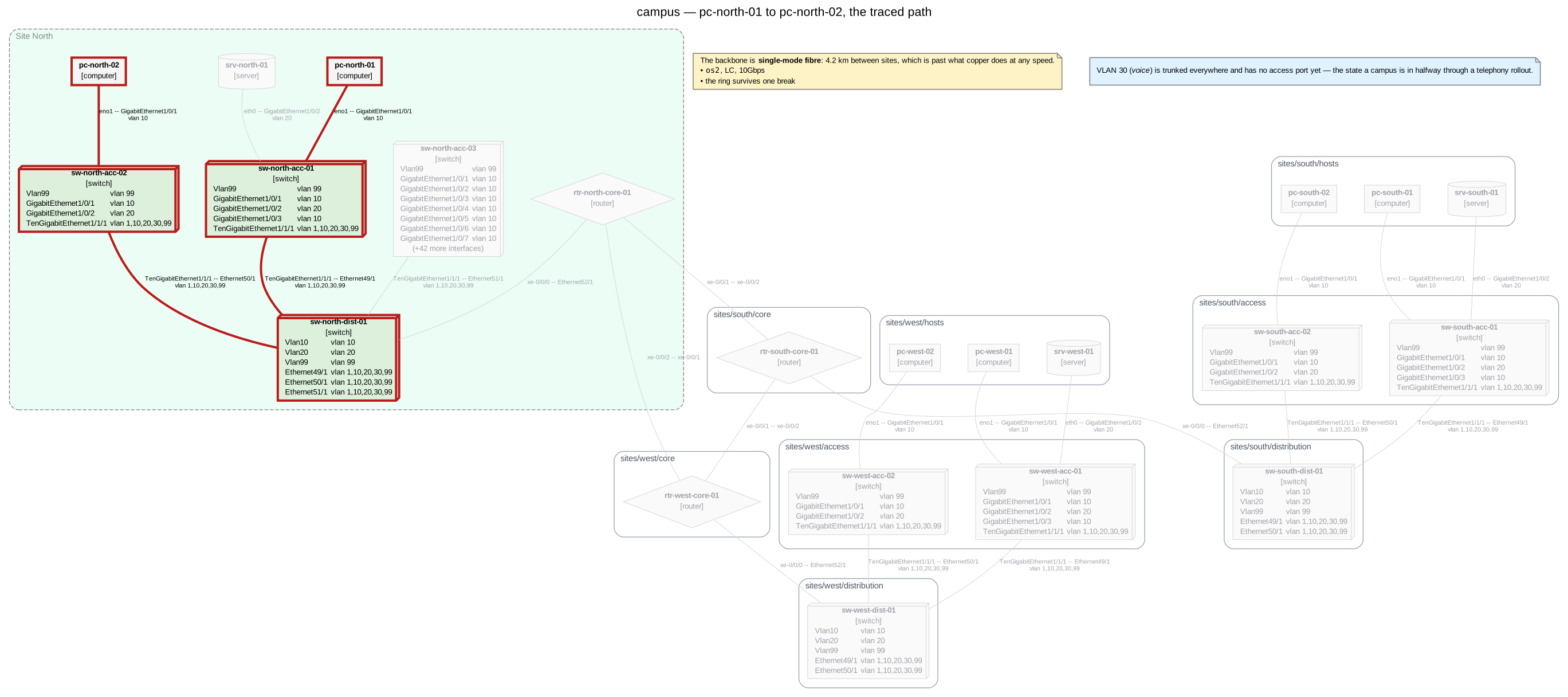
netviz -i examples/campus path pc-north-01 pc-north-02 --highlight -f svg -o docs/images/campus-path.svg --group-by-namespace --no-show-ips --title "campus — pc-north-01 to pc-north-02, the traced path".
Renders the whole inventory with the traced route emphasised — path elements
and links in bold crimson, everything else dimmed. Nothing is removed: a traced
path is visibly one route through a topology rather than the topology itself,
which is the thing --neighbors-of cannot show you.
- The diagram is built at the layer the path was found at, so a switched answer is drawn over cables and a routed one over prefixes. A trace that found nothing still draws — the topology it was looked for in, dimmed.
--allwidens the highlight to every reported route, which is how a redundant pair is best looked at.- Formats:
dot,svg,png,pdf. Emphasis is visual weight, and Mermaid and JSON have no such vocabulary — they are not offered rather than silently ignoring the flag. - Every display option
rendertakes works here too —--show-ips,--show-vlans,--group-by-namespace,--icons,--tooltips,--link-template,--element-ids,--title. It is the same renderer, not a fork of it. -fand-odescribe that diagram, so both require--highlight. Without-othe diagram goes to stdout and the hop-by-hop report moves to stderr, which is the same splitnetviz renderuses.
An element's own kind colour survives on the path — a highlighted switch still looks like a switch — and a dimmed link keeps its line style, so you can still see which of the roads not taken was fibre.
JSON output
$ netviz -i examples/campus path -F json 10.1.10.51 10.1.20.11
...
{
  "apiVersion": "netviz.dev/v1alpha1",
  "kind": "NetworkPath",
  "source": {
    "spec": "10.1.10.51",
    "element": "sites/north/hosts/pc-north-01",
    "name": "pc-north-01",
    "kind": "computer",
    "interface": "eno1",
    "address": "10.1.10.51/24"
  },
  "destination": { "…": "…" },
  "found": true,
  "layer": "l3",
  "maxHops": 16,
  "pathCount": 1,
  "truncated": false,
  "paths": [
    {
      "hops": 2,
      "layer": "l3",
      "family": "ipv4",
      "elements": ["sites/north/hosts/pc-north-01", "…"],
      "vlans": [],
      "waypoints": [
        {
          "element": "sites/north/hosts/pc-north-01",
          "name": "pc-north-01",
          "kind": "computer",
          "egress": { "interface": "eno1", "addresses": ["10.1.10.51/24"] }
        }
      ],
      "links": [
        {
          "id": "10.1.10.0/24",
          "kind": "subnet",
          "name": "10.1.10.0/24",
          "endpoints": [
            { "node": "sites/north/hosts/pc-north-01", "interface": "eno1" },
            { "node": "sites/north/distribution/sw-north-dist-01", "interface": "Vlan10" }
          ],
          "subnet": "10.1.10.0/24",
          "addresses": ["10.1.10.51/24", "10.1.10.1/24"],
          "vlans": []
        }
      ]
    }
  ]
}
A path is two arrays: waypoints (n entries) and links (n − 1), where
link i joins waypoint i to waypoint i + 1. That is easier to consume than
one array of alternating kinds, and the invariant is asserted when the path is
built rather than left to a reader to discover.
A link carries medium, speed, label and lengthM when it is a cable,
subnet and addresses when it is a prefix crossing, and a tunnel object
when a tunnel realises it:
"tunnel": {
  "id": "tunnels/vx-100",
  "type": "vxlan",
  "layer": 2,
  "stack": ["vxlan", "ipsec"],
  "encrypted": false,
  "protected": true,
  "vni": 100,
  "over": "tunnels/ipsec-hq-b",
  "encryptedBy": "tunnels/ipsec-hq-b"
}
stack is what makes vxlan over ipsec a fact a program can read rather than a
phrase it has to parse, and protected is the question
W127 asks,
already answered.
When nothing was found, paths is empty and frontiers says how far each
layer's search reached:
"found": false,
"frontiers": [
  { "layer": "l2", "reached": 2, "furthest": "sites/north/access/sw-north-acc-01", "depth": 1 }
]
Within one apiVersion these keys are only added, never renamed or removed, and
an absent optional key means "not configured" rather than "unknown" — the same
contract render -f json makes.
Options
| Option | Default | Effect |
|---|---|---|
--vlan VID |
derived | Trace inside this VLAN instead of deriving one. Forces a layer-2 answer and skips layer 3. |
--all |
off | Report every distinct path, not only the shortest. |
--max-hops N |
16 | Abandon a route that crosses more links than this. 1–64. |
-F, --output-format |
text |
text is the hop-by-hop report; json is the same trace for tooling. |
--highlight |
off | Also render the inventory with the path emphasised. |
-f, --format |
dot |
Format of the --highlight diagram: dot, svg, png, pdf. Requires --highlight. |
-o, --output PATH |
stdout | Where the --highlight diagram goes. Requires --highlight. |
--strict |
off | Treat warnings as errors when validating the inventory first. |
--force |
off | Trace even when validation failed. The path may not match the files. |
Plus every display option netviz render
takes, which apply to the --highlight diagram.
Validation runs before the trace and errors refuse it, for the same reason they refuse a render: a dangling cable is exactly the kind of thing that makes a path wrong, and a confidently wrong path is worse than no answer.
Exit codes: 0 a path was found, 1 there is none (or the inventory was
rejected), 2 an argument could not be resolved.
Modelling notes and limits
The trace answers a question about the declared topology. Some things it deliberately does not model:
- No routing table. A layer-3 hop means "these two elements share a prefix and the one in the middle forwards". There is no notion of a route, a metric, a default gateway or a policy, because an inventory declares none of those. When several routed paths exist, they are all reported and ranked by hop count; which one the network would actually pick is a question for the network.
- No spanning tree. Two layer-2 routes between one pair of switches are both reported; a real bridged network would block one of them. That is usually what you want from a diagram — the redundant link is the one you are checking for.
- No ACLs, firewall policy or VRFs. Reachability here is topological.
- No MAC learning, and no link state. An
enabled: falseport still carries a cable if one is declared on it;netviz validateis where an administratively-down port with a cable on it gets reported (W113), not here. - A router does not bridge. A
router,computerorserverterminates a layer-2 walk. A host configured as a bridge is a real thing and is not modelled; declare aswitchif that is what it is.
All of these are consequences of the schema being a description of cabling and configuration rather than of running state. Where a limit bites, the report says which layer it was searching and how far it got, so you can tell a modelling gap from a real break.
See also: netviz render --layer l3
for the routed graph this walks, docs/schema.md §14 for how a
tunnel is declared, and
docs/validation-rules.md for the checks that run before
the trace.