Styling: colours, shapes and themes
Every diagram on the other pages is drawn from the built-in palette: a diamond for a router, a 3-D box for a switch, green for the switching layer, amber for a power feed. That palette is a reasonable default and it is nobody's house style in particular. Until an element could carry a style, the only ways to say the core switches are navy were to remember a flag, or to open the exported SVG and paint it — and neither of those survives the next render.
This page is the other answer: how something is drawn is inventory data. A
colour somebody chose for the core switches is a decision about the network's
documentation, so it is written in the YAML beside the cabling, committed with
it, reviewed with it, and read back by everybody who renders the tree. That one
rule is what makes the visual editor's "select a shape, change how it looks"
loop expressible at all without the diagram and the description drifting apart:
the editor writes spec.style.fill, and the YAML is the record.
Two mechanisms, and a ladder that joins them. An element says how it is drawn,
in spec.style; a theme says how a whole class of
them is, in a kind: theme
document handed to --theme; and the ladder
decides, field by field, which of the two — or which of the theme's own rules —
you actually get.
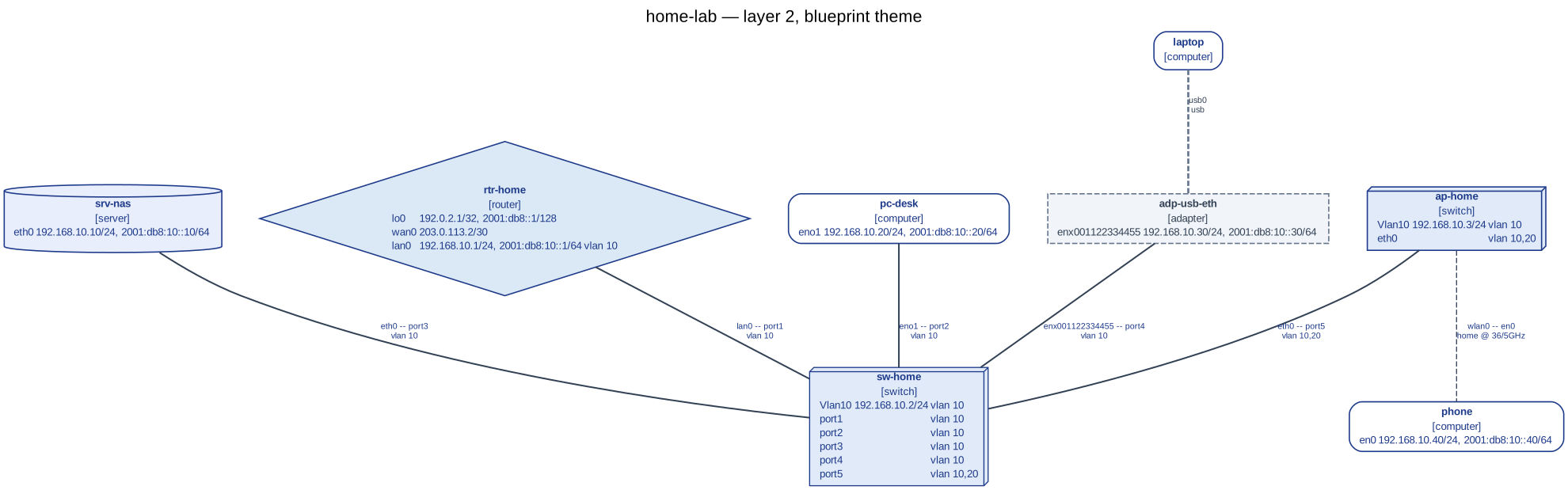
netviz -i examples/home-lab render --layer l2 --theme blueprint --title "home-lab — layer 2, blueprint theme" -f svg -o docs/images/home-lab-blueprint.svg.
docs/schema.md §22 is the
normative version of everything below: the field table, the selector table, the
precedence rule and the rule ids. This page is the guide — how to use it, in the
order you meet it.
Contents
- What a style is, and what it is not
- Styling one element
- The vocabulary
- Themes: a stylesheet for a class of elements
- The ladder: which rule wins
- A default for the inventory
--no-style: reading the plain diagram- What each output format carries
- In the editor
- When a style defeats itself
- See also
What a style is, and what it is not
A style lives inside the element, in the spec of the document that
declares the hardware. It is not a sidecar the way a
kind: layout document or a
note is, and that is a
choice rather than an accident: appearance is a property of the thing, there is
no key to go stale when the switch is renamed, and a git mv of the file moves
the colour with it.
The price is worth stating plainly, because you will meet it on the first
repaint: recolouring a switch is an edit to that switch's document.
netviz plan will show it, a reviewer will see it in the
diff, and a pull request that changes forty fills changes forty files. A style
is invisible to the network; it is not invisible to the changeset. If a change
should not land in the elements' own documents, express it as a
theme instead — that is half of
what themes are for.
What a style cannot reach, whatever it says:
- the graph. A view drawn with a stylesheet has exactly the nodes and the
edges of the same view drawn without one, at every layer. Hiding something is
what
--kind,--nameand the other filters are for, and they take it out of the topology as well as out of the picture. netviz path. No colour moves a hop, adds one, or changes which route is shortest.- generated device configuration. Nothing
netviz exportwrites for a device — netplan, networkd, ifupdown, FRR, WireGuard — knows that a fill exists. - a build. The two things that can go wrong semantically with a style are warnings. What fails is a document that could not be read at all, which is a different complaint.
Styling one element
spec.style is optional on all twelve element kinds — the five device kinds,
adapter, patchpanel, pdu, user, group, cable and tunnel. A node
gets a shape and a label; a link gets a line and a label; the block is the same
either way, so nobody who has just recoloured a switch has to learn a second
vocabulary to recolour the cable leaving it.
| Field | What it does |
|---|---|
fill |
Interior colour. none draws an unfilled shape. |
stroke |
Outline colour — and, on a cable or a tunnel, the colour of the line. |
strokeWidth |
Outline width in points. |
dash |
Line pattern: solid, dashed, dotted, bold. |
fontColor |
Label colour. |
fontSize |
Label size in points. |
shape |
The glyph a node is drawn as. Ignored on a link, which has no shape. |
icon |
A picture from the --icons theme, overriding its pick for this element's kind. none draws the plain shape. |
opacity |
How opaque the element is drawn, 0 to 1. |
Take examples/home-lab and paint its switch.
netviz edit writes the block for you, and --dry-run
shows the hunk without touching anything:
$ netviz -i examples/home-lab edit set sw-home spec.style.fill navy --dry-run
--- a/switches/sw-home.yaml
+++ b/switches/sw-home.yaml
@@ -85,3 +85,5 @@
       name: home
     - id: 20
       name: guest
+  style:
+    fill: navy
set sw-home spec.style.fill = "navy"
would change 1 file(s): switches/sw-home.yaml
That is the whole of the mechanism: a mapping under spec, written by hand just
as readily as by a command. Filled out, with the label made legible against the
new fill and the outline thickened because this is the switch everything hangs
off:
apiVersion: netviz.dev/v1alpha1
kind: switch
metadata:
  name: sw-home
  labels:
    role: access
spec:
  vendor: TP-Link
  style:
    fill: navy
    fontColor: white
    strokeWidth: 3
  interfaces:
    - name: port1
      type: ethernet
A link is styled the same way, out of the same nine fields:
apiVersion: netviz.dev/v1alpha1
kind: cable
metadata:
  name: cbl-sw-ap
spec:
  endpoints:
    - sw-home:port5
    - ap-home:eth0
  medium: copper
  style:
    stroke: orange
    dash: bold
Every field is optional, and an absent one means inherit. Nothing in the
block has a default, deliberately: a default written into the document would pin
the value to the element and defeat the inheritance it is meant to fall through.
Setting only a fill keeps the theme's shape; unsetting a field
(netviz edit unset sw-home spec.style.fill) is how you go back to what the
theme says, and it is the honest way to do it — writing the inherited value in
by hand would freeze today's theme into the document.
An empty style: {} is an error rather than a no-op. It renders identically to
no block at all, so a writer who typed it would get no signal that a
half-finished edit or a key indented one level too far had done nothing.
Three keys are camelCase — strokeWidth, fontColor, fontSize — which is the
one exception to the schema's naming rule and is called out here rather than
left for you to trip over. They are the spellings SVG, mxGraph and netviz's
own JSON already use, and this is the one part of a document read and written by
drawing tools rather than by network ones.
Finally, the nodes a view derives rather than reads — an
l3 subnet, a
rack, a namespace collapsed
by --collapse — have no document, so there is nothing to hang a spec.style
on. They are not unstyleable: a theme reaches them by kind.
The vocabulary
Colours are a hex literal (#rgb or #rrggbb) or one of twenty-four names:
| Name | Hex | Name | Hex | Name | Hex |
|---|---|---|---|---|---|
none, transparent |
no colour | red |
#dc2626 |
cyan |
#0891b2 |
white |
#ffffff |
maroon |
#991b1b |
blue |
#2563eb |
black |
#111827 |
orange |
#ea580c |
navy |
#1e3a8a |
grey, gray |
#6b7280 |
amber |
#b45309 |
indigo |
#4338ca |
silver |
#e2e8f0 |
yellow |
#eab308 |
violet |
#7c3aed |
slate |
#475569 |
brown |
#78350f |
purple |
#9333ea |
olive |
#65a30d |
lime |
#84cc16 |
magenta |
#c026d3 |
green |
#16a34a |
teal |
#0f766e |
pink |
#be185d |
It is a curated set rather than the CSS list. Every name has to read the same in
a Graphviz SVG, on a draw.io canvas and in a browser, and the CSS names include
several pairs no reader can tell apart plus a long tail nobody reaches for.
Twenty-four cover a diagram's palette; anything more particular is hex, which is
always accepted. The hues are the ones the built-in palette already draws with,
so fill: green gives a switch the green it has by default rather than a
second, slightly different one. Your spelling is kept — navy is what
netviz fmt leaves in the file, and the resolution to #1e3a8a
happens once, on the way to a renderer.
The rest of the vocabulary:
| Field | Values |
|---|---|
shape |
box, rounded, ellipse, circle, diamond, hexagon, triangle, cylinder, box3d, folder, note, parallelogram, trapezium, plaintext |
dash |
solid, dashed, dotted, bold |
strokeWidth |
greater than 0, at most 20 points |
fontSize |
6 to 96 points |
opacity |
0 to 1 |
icon |
a bare lower-case name from the --icons theme, or none |
The shapes are the intersection of what Graphviz draws and what draw.io can
be told to draw, so a shape survives an export and a re-import; anything
Graphviz alone knows would be lost on the way back, which is worse than not
being able to ask for it. The dashes are spelled as Graphviz spells them, and
bold is in the list although it is a width rather than a pattern — the
built-in palette already draws a fibre run with it, and a theme that wants to
restate a default has to be able to say what the default is. The bounds are
not arbitrary either: below six points nobody reads a label, above ninety-six
one node is the whole page, and a twenty-point outline is thicker than most
nodes are tall.
icon is a name and never a path. It is resolved inside the --icons theme's
directory exactly as an element kind is, which is what stops a manifest shared
across a team from reaching outside the directory it was rendered with. With no
icon theme in use there is nothing to choose from and the field is inert.
Why the vocabulary is closed
Every value here ends up inside a Graphviz attribute, an mxGraph style string or
an SVG attribute — three text formats netviz generates. A free-form
pass-through would mean a fill of red", shape="none reaching a DOT file, or
#fff;shape=image;image=data:... reaching a draw.io style. Both are injection,
and an inventory — pulled from a branch, merged from a contributor, emitted by
somebody's importer — is exactly the wrong place to be able to do it.
So nothing reaches an output format unvalidated, and the closure is what buys the diagnostic worth reading. A typo in a colour name is the likeliest mistake in the whole block, so it is answered with the nearest legal spelling, and an edit that would introduce it is refused before anything is written:
$ netviz -i examples/home-lab edit set sw-home spec.style.fill navvy
error: the edit would introduce 6 new problems; nothing has been written (use --force to write it anyway)
  switches/sw-home.yaml#0:89:11: NV-Z001: 'navvy' is not a colour; write '#rgb', '#rrggbb' or a named colour; did you mean 'navy'?
...
The five findings elided there are the cables: a document whose style does not
parse is a document that did not load, so the switch's ports are briefly not
there and everything patched into them dangles. That cascade is the reason
NV-Z001 is refused at the moment of writing rather than reported later — a bad
value is wrong when it is typed and wrong afterwards, and there is no
half-finished gesture to protect.
Themes: a stylesheet for a class of elements
An element's own block says how that element is drawn. A theme says how a
class of them is: every router navy, everything under sites/dc-* on a slate
background, everything labelled tier: core two points heavier. It is the layer
that keeps a consistent diagram from being forty copies of the same four lines —
and, because it is not part of the inventory, the layer that lets you restyle
the whole estate without touching a single element's document.
A theme is a single YAML file in netviz's usual envelope, holding an ordered
list of select/style rules:
apiVersion: netviz.dev/v1alpha1
kind: theme
metadata:
  name: house
  description: The blue the drawings have always been.
spec:
  rules:
    # No clauses: the background every other rule adjusts.
    - style:
        fill: white
        stroke: navy
        fontColor: navy
        shape: box
    - select:
        kind: [router]
      style:
        fill: "#dbe9f6"
        shape: diamond
    - select:
        kind: [switch, hub]
      style:
        fill: "#e0eaf8"
        shape: box3d
    - select:
        namespace: sites/dc-**
        role: [core]
      style:
        strokeWidth: 3
        fontSize: 12
    - select:
        kind: [cable]
        label: {medium: fibre}
      style:
        stroke: orange
        dash: bold
A theme is not an inventory kind. The loader never walks a tree for one, and
a theme.yaml dropped into an inventory directory styles nothing at all. It
describes a rendering rather than a network, and one inventory is legitimately
drawn several ways — an operations diagram, a black-and-white one for the wall,
a simplified one for a slide. Keeping it outside the tree is what makes
--theme a switch rather than an edit, and what stops a file somebody added to
a shared folder from silently restyling everybody else's diagrams. It is read by
the same strict loader the manifests are, one document per file.
The five selector clauses
| Clause | Matches |
|---|---|
kind |
What the diagram calls this thing: router, cable, tunnel, and the derived subnet, rack and namespace. |
name |
A glob on metadata.name. |
namespace |
A glob on the directory the document was found in. * does not cross a /; ** does. |
role |
Values of the role label. |
label |
Every entry must be present with that value; "*" matches any value, i.e. keys off the label's presence. |
Every clause takes a bare string or a list of alternatives — kind: router and
kind: [router] are the same rule — and any one alternative matching is enough.
Clauses are conjunctive: every clause a selector states has to hold. An
omitted clause is not so much a wildcard as an absent condition, and a rule with
no clauses at all matches everything, which is how a theme states the background
the rest of it adjusts.
Two of those deserve a sentence each. namespace: sites/* catches one level and
sites/** catches the tree, because a namespace is a path and a glob that
ignored the separator would make the narrower of the two unsayable. And role
is pure shorthand: role: [core] and label: {role: core} select identically —
it exists because role is the one label every inventory grows and because the
shorthand is what people write. Both of them read metadata.labels and nothing
else: the label: {medium: fibre} in the theme above matches a cable somebody
labelled that way, not one whose spec.medium says fiber. A selector sees
the element's identity — kind, name, namespace, labels — and never its
configuration, which keeps a stylesheet from quietly becoming a second, weaker
query language over the network.
kind is worth a second look, because it is the word the drawing uses and not
only the word the schema uses. For anything an inventory declares the two agree;
for the nodes a view computes it is subnet, rack or namespace, which is
how those become styleable at all. A tunnel is tunnel whichever way a layer
draws it — as a node or as an edge — and an adapter's attachment line is
adapter, the same word as the adapter node, so a rule about one is a rule
about both. A rule with no clauses matches links as well as nodes, which is
usually what you want for a colour and never means anything for a shape;
shape is simply ignored on a line.
Choosing one
--theme takes a bundled name, a path to a kind: theme file, or none:
netviz render --theme blueprint -f svg -o topology.svg
netviz render --theme ./themes/house.yaml -f svg -o topology.svg
netviz render --theme none -f svg -o topology.svg      # override one from netviz.toml
Every command that draws takes it: render,
watch, web,
path, diff,
layout and
export drawio. layout takes one because a node's size
depends on its shape and its label, so an arrangement should be computed under
the theme it will be drawn with.
A theme that does not exist, or whose colours do not parse, is a usage error naming the option — reported before the inventory is loaded, so a typo costs you nothing:
$ netviz -i examples/home-lab render --theme houes -f dot
Usage: netviz render [OPTIONS]
Try 'netviz render --help' for help.

Error: Invalid value for '--theme': unknown theme 'houes': it is neither a built-in theme (blueprint, mono) nor a file that exists
Two themes ship, and they are two different arguments rather than two palettes:
blueprint— engineering-drawing blue on white. One hue for the data path, amber for power, rose for people, and line weight rather than colour for the tiers, so it survives a black-and-white print. It is the picture at the top of this page.mono— the colour taken away entirely. Shape carries the kind and the line pattern carries the medium, which is the rule the built-in palette already follows and whichmonomakes literal, for a photocopier or a colour-blind reader.
Both are short, commented and worth reading as worked examples; they live in
src/netviz/render/themes/.
The ladder: which rule wins
Four rungs, most specific first. The first rung that sets a field wins that field, and the rest of the block keeps falling through — so a theme that sets only a fill does not wipe out a shape, and an element that sets only a fill still takes the theme's shape.
- The element's own
spec.style. Somebody wrote it about this one thing. - The theme's rules, most specific first. Specificity is the number of
conditions a selector states, so
{kind: switch, role: core}(two) beats{kind: switch}(one), which beats a rule with no clauses at all. Equal specificity is broken by declaration order, and later wins. - The icon theme, which supplies
iconand nothing else. - The built-in palette, which has a fill, a stroke and a shape for every kind, so the ladder always terminates and every drawn thing has a complete answer.
Later-wins on a tie is the rule every stylesheet language settled on, and the one a reader guesses right without being told. It is also what makes themes compose: appending rules is how a theme is extended, and an appended rule that states as many conditions as the one it disagrees with wins without having to say so.
You do not have to take this on trust. The JSON export publishes the resolved
style of every node and every edge together with a from map naming the rung
each value came from — element, theme:<name>#<index>, icons or default,
where the index is the winning rule's 0-based position in the theme file. Here
is sw-home of the home lab, under blueprint:
$ netviz -i examples/home-lab render --theme blueprint -f json
...
      "style": {
        "fill": "#e0eaf8",
        "stroke": "#1e3a8a",
        "strokeWidth": 1.0,
        "fontColor": "#1e3a8a",
        "shape": "box3d",
        "from": {
          "fill": "theme:blueprint#2",
          "stroke": "theme:blueprint#0",
          "strokeWidth": "theme:blueprint#15",
          "fontColor": "theme:blueprint#0",
          "shape": "theme:blueprint#2"
        }
      }
...
rendered 8 node(s) and 7 edge(s) as json at layer l1
Read that against
blueprint.yaml. sw-home is a
switch, in the namespace switches, labelled role: access, and three of the
theme's rules match it:
| Rule | Selector | Clauses | Sets |
|---|---|---|---|
#0 |
none | 0 | fill, stroke, fontColor, shape |
#2 |
{kind: [switch]} |
1 | fill, shape |
#15 |
{role: [access]} |
1 | strokeWidth |
| Field | Resolved | From | Why |
|---|---|---|---|
fill |
#e0eaf8 |
#2 |
Both #0 and #2 set a fill; #2 states one condition and #0 states none. |
shape |
box3d |
#2 |
Likewise. |
stroke |
#1e3a8a |
#0 |
#2 is more specific but says nothing about the outline colour, so the field keeps falling. |
fontColor |
#1e3a8a |
#0 |
The same. |
strokeWidth |
1.0 |
#15 |
The only rule that sets it. Nothing contests a field only one rule mentions. |
Now change one thing. Had sw-home carried a spec.style of its own setting
fill: navy, the top rung would answer first and the from map would read
"fill": "element" — while stroke, fontColor, shape and strokeWidth
went on resolving exactly as above, because the element said nothing about them.
That is the whole of the interaction between the two mechanisms.
And for the tie-break: append a rule of your own selecting
{kind: [switch]} — one condition, the same as #2 — and it wins the fill,
because it was declared later. It would not beat a rule stating two
conditions, because specificity is still read first. An inline rule that has to
beat a specific one states at least as many conditions as it does.
What the ladder does not decide is emphasis. A
path --highlight and a
netviz diff overlay are applied on top of a resolved
style and win over it: a removed device drawn in your chosen navy instead of red
would make the diff unreadable, and the point of an overlay is that it is louder
than the drawing underneath it.
A default for the inventory
Passing --theme on every invocation is how the colours end up depending on
somebody's shell history. netviz.toml is where they stop
depending on it — and it offers two levels, which compose:
# netviz.toml, at the root of the inventory
[render]
theme = "blueprint"          # or "./themes/house.yaml", relative to *this file*

[[theme.rules]]              # this inventory's own house style, inline
select = {role = ["access"]}
style = {fill = "amber", strokeWidth = 3}

[[theme.rules]]
select = {namespace = ["sites/hq/**"]}
style = {fill = "#f8fafc"}
[render] theme names a theme, exactly as --theme does, and a relative
path resolves against the configuration file rather than the working
directory — the file lives with the inventory, and a colleague who runs
netviz from a parent folder has to get the same picture.
The [theme] table is the other half: rules written inline, for the inventory
that wants three lines of house style and not a second file to keep beside the
manifests. The entries under [[theme.rules]] are exactly the spec.rules of a
theme document and go through the same models, so a mistyped colour in
netviz.toml is refused with the same wording it would get in a theme.yaml.
The inline rules are appended to the named theme's rather than merged into
them, and that is the entire mechanism: given later-wins on a tie, appending is
what lets an inventory adjust a bundled theme without restating the rules it
agrees with. [[theme.rules]] with one clause beats a bundled rule with one
clause; it does not beat a bundled rule with two. With the file above,
sw-home — role: access, and so caught by the first inline rule — comes out
amber rather than blueprint's pale blue, and the JSON says why: its fill now
reads theme:blueprint+theme#16, one past the last of the sixteen rules
blueprint itself declares.
--theme on the command line overrides [render] theme, --theme none turns
the named theme off, and the inline [theme] rules apply either way — they are
this inventory's own, not a default somebody picked. See
docs/configuration.md
for the table's exact shape and
precedence for how a flag, a profile and the file
rank against each other.
--no-style: reading the plain diagram
--no-style (or style = false under [render]) renders with the bottom two
rungs only: the icon set and the built-in palette. Every declared style, element
and theme alike, is ignored:
$ netviz -i examples/home-lab render --theme blueprint --no-style -f json
...
      "style": {
        "fill": "#dcf0dc",
        "stroke": "#16a34a",
        "shape": "box3d",
        "from": {
          "fill": "default",
          "stroke": "default",
          "shape": "default"
        }
      }
...
rendered 8 node(s) and 7 edge(s) as json at layer l1
The drawing it produces is byte-identical to what the same inventory
produced before styling existed — render --theme blueprint --no-style -f dot
and a bare render -f dot are the same file — and that identity is the point of
the flag: it is the answer to "is this diagram odd because of the network, or
because of the stylesheet?". An escape hatch that produced a nearly plain
diagram would not answer it. The JSON keeps publishing a style object either
way, because the ladder always terminates; every entry in its from map just
says default, which is the machine-readable spelling of the same claim.
Icons are a separate rung and are unaffected — --icons none is the switch for
those, and the two are independent on purpose: a plain-coloured diagram with
pictures, and a styled one without them, are both things people want.
What each output format carries
The ladder is walked once, centrally, and each backend translates the answer rather than re-deriving it. That is why a switch somebody painted navy is navy in the SVG, in the draw.io file and in the JSON, and is navy for the same reason.
| Output | What it does with a style |
|---|---|
dot, svg, png, pdf, html |
All nine fields. opacity is folded into the alpha channel of the fill, the outline and the label, which is how a per-element transparency survives into a raster format. |
| draw.io | All nine. mxGraph spells this vocabulary almost one for one — which is why shape is the intersection it is — so a colour chosen here opens in the app as that colour and survives a round trip. |
json |
The resolved style plus its provenance: every node and every edge carries a style object with a from map. Always present, because the ladder always terminates; under --no-style every entry says default. |
mermaid |
Nothing. It is ignored. |
Mermaid is the one that needs an explanation. A flowchart has exactly one
styling construct, classDef, and it is per class rather than per node —
netviz already spends it restating the built-in palette, one classDef per
node kind present, so that a diagram embedded in a pull request is coloured like
the diagrams beside it. There is nowhere left to put a per-element style and no
honest way to fake one. A Mermaid diagram is the palette's diagram; where the
styling is the point, export a format that can carry it.
One warning about the draw.io round trip, which
docs/drawio.md states from the other side:
a colour changed in draw.io does not come back. Style is regenerated from the
ladder on every export, so the way to change it permanently is to change the
YAML or the theme — which is the same rule as everywhere else on this page.
In the editor
netviz web has a docked style inspector: the resolved
appearance of whatever is selected, field by field, with the rung each value
came from named beside it — so the panel can say this navy is the theme's, not
yours rather than leaving you to guess. Changes made there are ordinary
spec.style.* edits, going through the same operations, the same
validation gate and the same undo stack as every other write; and reset to
theme unsets the field rather than writing the inherited value into the
document, which is the only version of that button that keeps working when the
theme changes. netviz web --theme picks the stylesheet the inspector
resolves against, since it names a file on the machine running the server rather
than in the browser.
It reads a map the render carries rather than the picture on screen, which is what lets it name the rung at all — by the time a colour is an SVG attribute, the element, the theme, the icon set and the palette have collapsed into one hex literal. Two consequences worth knowing. A view that does not draw the selection has no appearance for it to show, and the panel says so instead of going blank. And with the changes drawer open the canvas is a diff, so the colours on screen are the changeset's marks — added, removed, changed — rather than the values in the rows; the panel says that too, and stays editable, because a diff is a way of looking at the tree and not a reason to stop styling it.
When a style defeats itself
Two things can be wrong with a style whose every value is legal. Both are
warnings from the semantic validator rather than schema errors, because each
value is fine on its own and only the combination is a mistake — which is
precisely what an editor passes through on its way somewhere else. Dragging an
opacity slider from one end to the other visits opacity: 0.
| Rule | Fires when |
|---|---|
W144 (NV-Z003) |
An element sets opacity: 0. It is still drawn, invisibly, and every link to it is still drawn into the empty space where it is — a diagram that lies. It is almost always a slider left at the wrong end; hiding an element is what the filters are for. |
W145 (NV-Z005) |
An element gives fill and fontColor the same colour, so the label is drawn where nobody can read it. |
W145 fires only when both colours are written on the same element. It
never fires on an inherited pair: a theme setting the fill and an element the
font colour is a legitimate combination whose result the person who wrote it can
see, and a warning about a pair the element does not fully control is one nobody
can act on without editing somebody else's file. fill: none is exempt for the
same reason — it means "whatever is behind this", and dark text on it is the
ordinary way to draw an unfilled shape.
Both are suppressible per rule and per document, exactly as every other warning
is; their pages in docs/validation-rules.md say when
that is the right call.
The errors are a different matter. NV-Z001 (a value outside the vocabulary),
NV-Z002 (an empty style block) and NV-Z004 (an unusable theme document)
are reported while the document is read, by the schema rather than by the
validator, and are deliberately absent from the suppressible catalogue. There is
nothing to suppress: an element whose style does not parse is an element that
did not load, and a theme that does not parse was applied to nothing.
See also
docs/schema.md§22 — the normative specification: every field, every clause, the precedence rule and the rule ids.docs/rendering.md— everything else about a diagram: layers, filters, aggregation, icons, labelling and the output formats.docs/configuration.md—[render] themeand the[theme]table, beside every other setting.docs/editing.md— the write path a style edit takes, and the two gates between an edit and the disk.docs/drawio.md— the round trip, and what a draw.io user may safely change.src/netviz/render/themes/— the two bundled themes, commented.