A walkthrough of the operator console
The web console reference lists every page and the endpoints behind it. This page does something different: it walks the console in the order you actually meet it, from an empty deployment to one issuing, revoking and proving things — and shows each step.
That order is the one thing worth knowing before you begin. A PKI is built root-first and torn down leaf-first. Until a certificate authority exists there is nothing to issue under, nothing to revoke, no CRL to publish and no chain to validate; most of the console's pages are empty or refuse to act. So the walk starts at Authorities, not at Certificates — even though Certificates is the tab the console opens on, because that is where you spend the rest of your life.
- Before you start
- 1. Signing in
- 2. Build the hierarchy
- 3. Prove where the keys are
- 4. Issue a certificate
- 5. Dry-run it first
- 6. The issued estate
- 7. When a key is compromised
- 8. What breaks next
- 9. Across every CA
- 10. Prove a chain
- 11. What a relying party needs
- 12. The other CA: SSH
- 13. What a signing request may ask for
- 14. Signing artifacts
- 15. The other half: secrets
- 16. The stored-secret registry
- 17. The audit log
- 18. Delegating one CA
- 19. Machine callers
- 20. Compliance evidence
- 21. Day-2 diagnostics
- 22. What is actually on the token
- Where to go next
The screenshots are of a throwaway PKI belonging to an invented company,
Northwind Logistics GmbH, under .example names, rebuilt from scratch by
scripts/screenshots/capture.sh and destroyed afterwards — so every serial,
subject and audit entry in them is one the product generated for the picture,
and none of it is anyone's. Every certificate was signed by a key generated
inside a SoftHSM token; the CRLs are real CRLs and the audit log is a real hash
chain. Why it is done this way.
Before you start
The console is served by the server itself, at /console/, out of the binary —
there is no separate front-end to deploy, and nothing extra to turn on:
/ redirects there, and it is the only UI: the separate Bootstrap SPA that used
to be served from disk is gone, along with the question of which of two pages
was authoritative.
It holds no privileges of its own. Every button on every page calls the same
RBAC-gated, audited REST API that secsy-ca calls, with your credentials
attached, so the console can do exactly what you can do and nothing more —
and everything it does lands in the audit log under your name. That is also why
this walkthrough is useful even if you intend to script everything: the pages
map onto commands almost one-to-one — section 13 is the single exception — and
the parity matrix names the mapping both ways.
1. Signing in
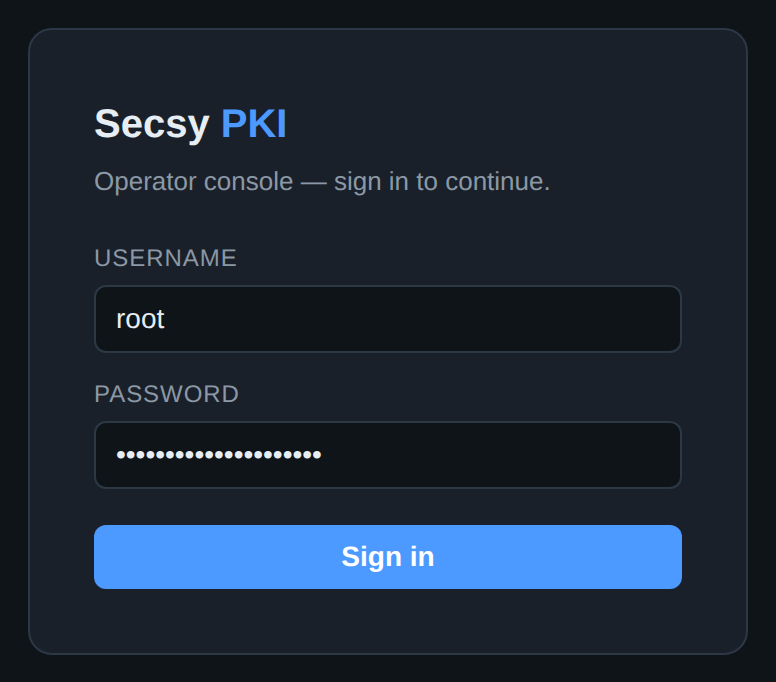
The form tries, in order, the authentication methods the server has configured:
a directory (LDAP/AD) bind, then the built-in root password. Both establish a
server-side session with a CSRF token, which is what lets the console offer
WebAuthn step-up on high-risk operations later. With OIDC configured, a Sign in
with SSO button appears below the divider — under a line naming the protection
the redirect will use, "OpenID Connect Authorization Code flow with PKCE (S256)",
read from the server's own discovery document
rather than asserted by the page — and the password form stays for break-glass.
With several identity providers
configured, that becomes one button per provider — Sign in with Microsoft Entra
ID, Sign in with Okta — so an operator picks their own IdP.
The root account in the screenshot is the one to plan to stop using. It is
a shared password with full authority over every tenant, it exists so a brand-new
deployment can be administered at all, and it is the obvious thing to find in a
breach. Once real operators can sign in — through OIDC, LDAP, or client
certificates — set policy.allow_root_basic_auth: false and it is gone. The
options and the trade-offs are in
operator authentication.
2. Build the hierarchy
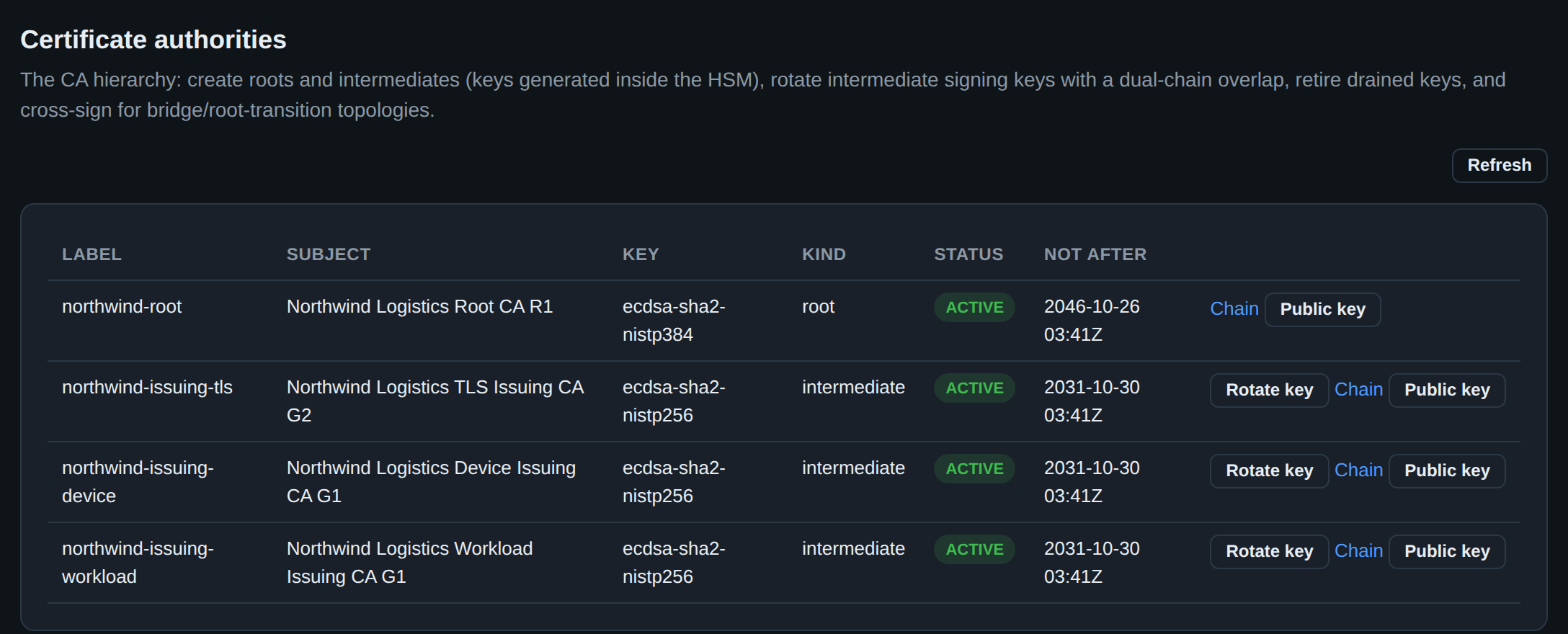
Authorities is the hierarchy, and it is the first page that matters. Each row is a CA: its label (which is also its key label on the token), its subject, the key the HSM holds for it, whether it is a root or an intermediate, and how long it has left.
The shape above is the one to copy. One offline-ish root with a long life, several short-lived intermediates underneath it, one per purpose. Splitting by purpose — public TLS, device fleet, platform workloads — is not bureaucracy: an intermediate is the unit you can rotate, constrain and revoke independently, so a compromised device-enrollment key costs you the device fleet rather than the company. The root signs three certificates in its life and otherwise does nothing.
Rotate key starts a dual-chain rollover: the CA gets a new signing key while the old one keeps serving its already-issued certificates through an overlap window, so nothing breaks at the moment of the swap. There is no button that destroys a key in one click.
Public key is on every row, including the root's, and asks which shape you
want before it exports: SPKI PEM for X.509 tooling, or the single OpenSSH line
an sshd TrustedUserCAKeys file wants. It is the half of the key pair that is
meant to be published — the private half has never left the token and has no
export button anywhere in this console.
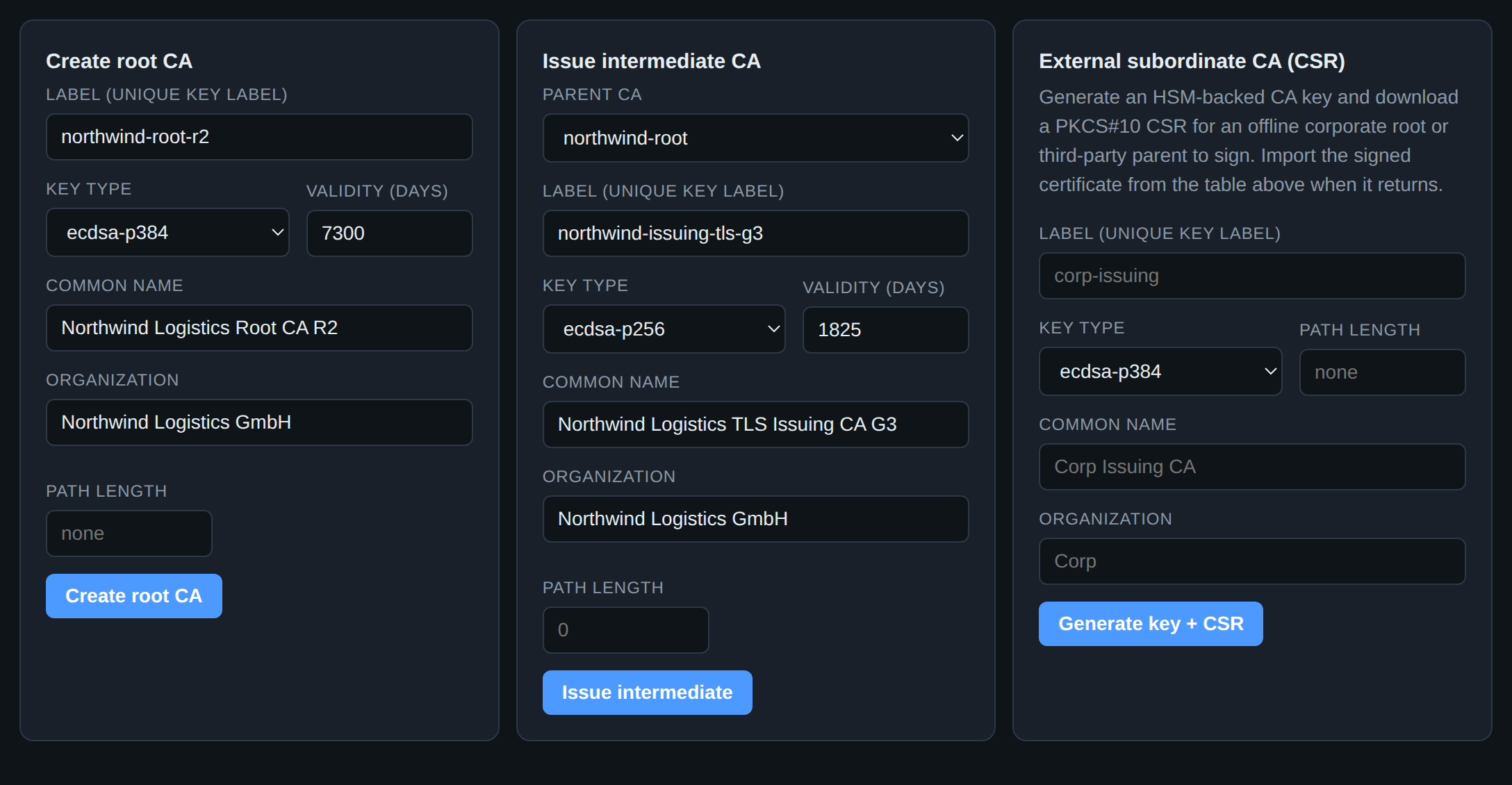
Below the table are the three ways a CA comes into existence, and which one you want depends on who owns the trust anchor:
| Form | Use it when |
|---|---|
| Create root CA | this PKI is its own trust anchor — an internal/private PKI |
| Issue intermediate CA | the parent is a CA this deployment already holds |
| External subordinate CA (CSR) | the parent is an offline corporate root or a third party; you get a key and a CSR, they return a certificate (details) |
Two fields deserve a decision rather than a default. Key type is the one
thing you cannot change later without re-issuing everything beneath it —
ecdsa-p384 for a root, ecdsa-p256 for issuers, RSA only when a client in
your estate still cannot do better. And path length 0 on an intermediate
means this CA may issue leaves and no further CAs, which is the constraint
that stops an issuing CA from quietly becoming a parent. Set it.
Whichever form you use, the private key is generated inside the token and is never in the server's memory. There is no form here that accepts one, because there is no code path that would do anything with it. (Adopting a CA that already exists elsewhere is a deliberate, separate operation — importing an existing CA.)
The extensions you only get to choose once
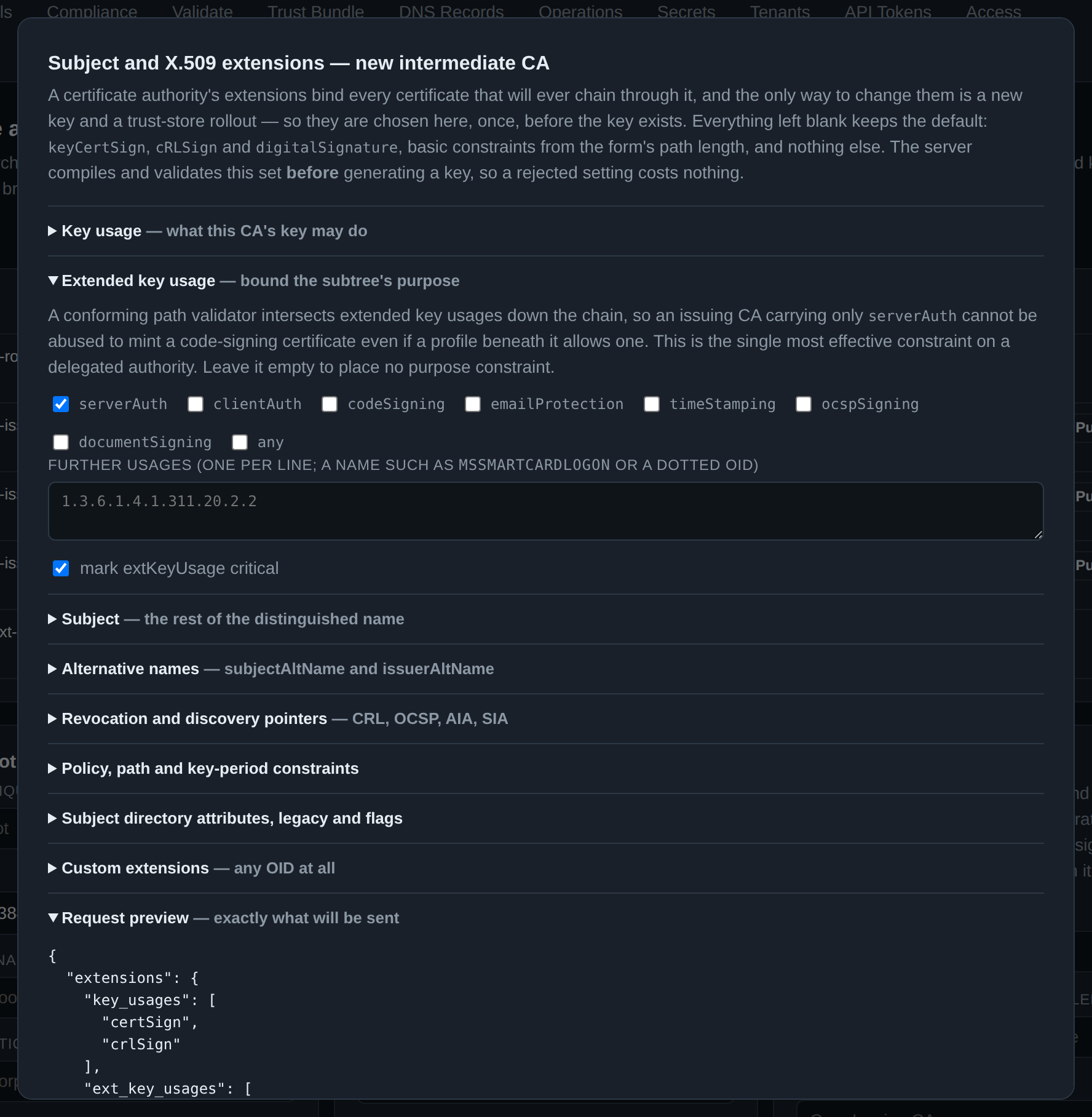
Each of the three forms carries an X.509 extensions… button, and this is where most of the thinking goes. A leaf is short-lived and reissued constantly; a CA's extensions bind every certificate that will ever chain through it, and the only way to change them is a new key and a trust-store rollout. So the whole common extension vocabulary is accepted here, once, before the key exists:
| Section | What it decides |
|---|---|
| Key usage | what this key may do. keyCertSign cannot be cleared — a CA that cannot sign certificates is a misconfiguration, and the server refuses it |
| Extended key usage | the strongest constraint available on a delegated authority. A validator intersects EKUs down the chain, so an issuer carrying only serverAuth cannot mint a code-signing certificate even if a profile here allows one |
| Subject | the rest of the DN — registry identifiers, a postal address, domain components, and any attribute at all by name or OID |
| Alternative names | subjectAltName / issuerAltName, every GeneralName type including UPNs and otherName |
| Revocation and discovery pointers | where the parent publishes this certificate's CRL and OCSP, where the parent's own certificate can be fetched, and what this CA itself offers (its repository, its TSA) |
| Policy, path and key-period | inhibitAnyPolicy, and the private-key usage period that retires the key before the certificate expires |
| Legacy and flags | must-staple, ocsp-nocheck, the two Netscape extensions, an explicit subject key identifier |
| Custom extensions | any OID at all, in eleven value encodings — including raw DER for a syntax nothing here models |
The dialog's last section is a request preview: the exact JSON body the form will send. Read it before you press Create — and note that the server compiles and validates the same set before generating a key, so a rejected setting costs nothing but the error message. Name constraints and certificate policies are not in this dialog; they have their own editor on the Restrictions view (section 18). The full reference is the CA certificate extension set.
3. Prove where the keys are
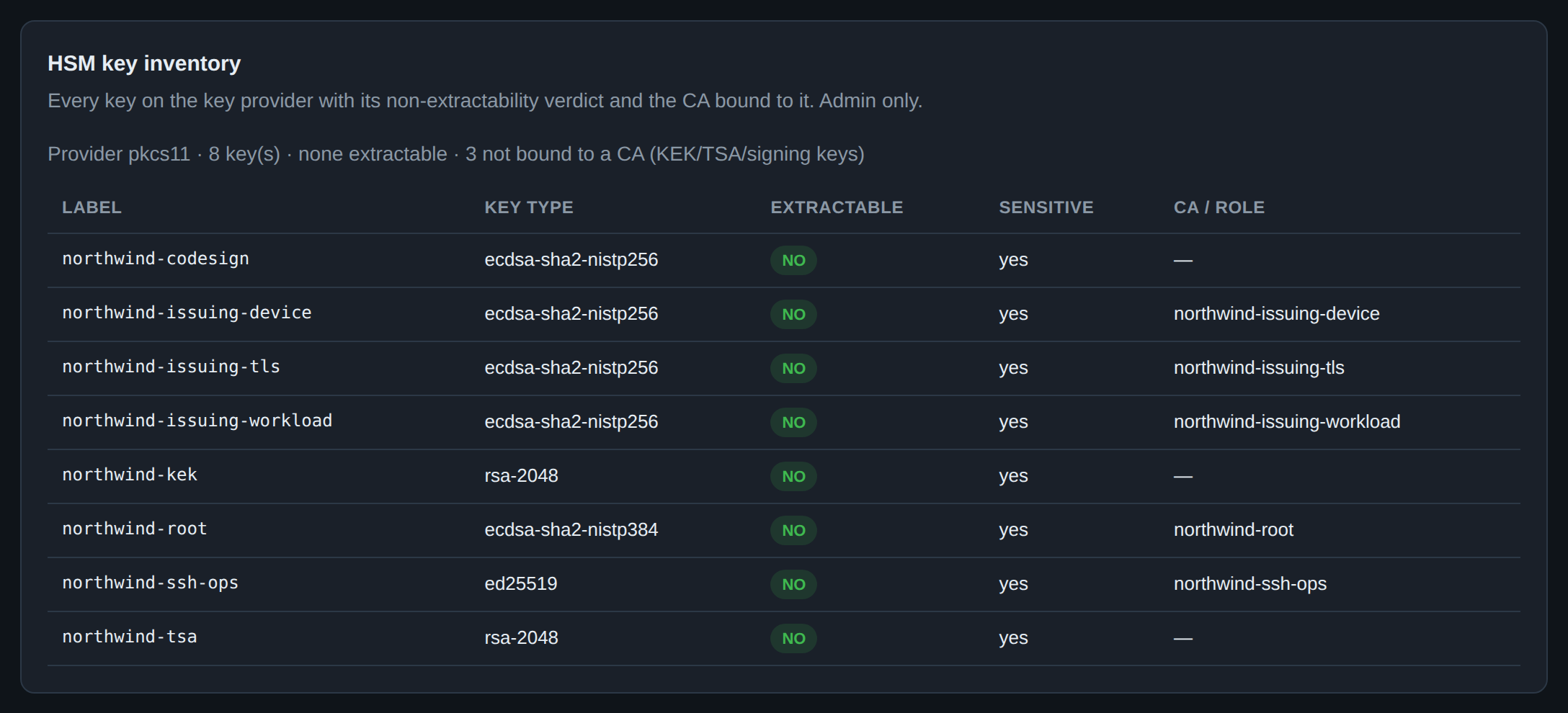
This panel, at the bottom of the same page, is the product's central claim made checkable. For every key on the provider it reports the two PKCS#11 attributes that decide whether "HSM-backed" means anything:
CKA_EXTRACTABLE = false— the token will not export this key, wrapped or otherwise. The column reads NO, and that is the answer you want.CKA_SENSITIVE = true— the token will not reveal the key's value to an application, even to the one that created it.
A key showing yes under Extractable is a key that could leave, and the summary
line counts them so a single bad one cannot hide in a long list. The not bound
to a CA count is not a warning: the KEK, the timestamping key and the
code-signing key are legitimately not CA keys.
This is an inventory, not a proof. It reports what this token says about itself, which is exactly as trustworthy as the token. On a YubiHSM you can go further and get a certificate, signed by a key Yubico put in the device at manufacture, attesting that a named key was generated on-device and cannot be exported — see key attestation. On SoftHSM, as here, there is no such hardware claim to make, and that is the honest difference between a development token and an HSM.
4. Issue a certificate
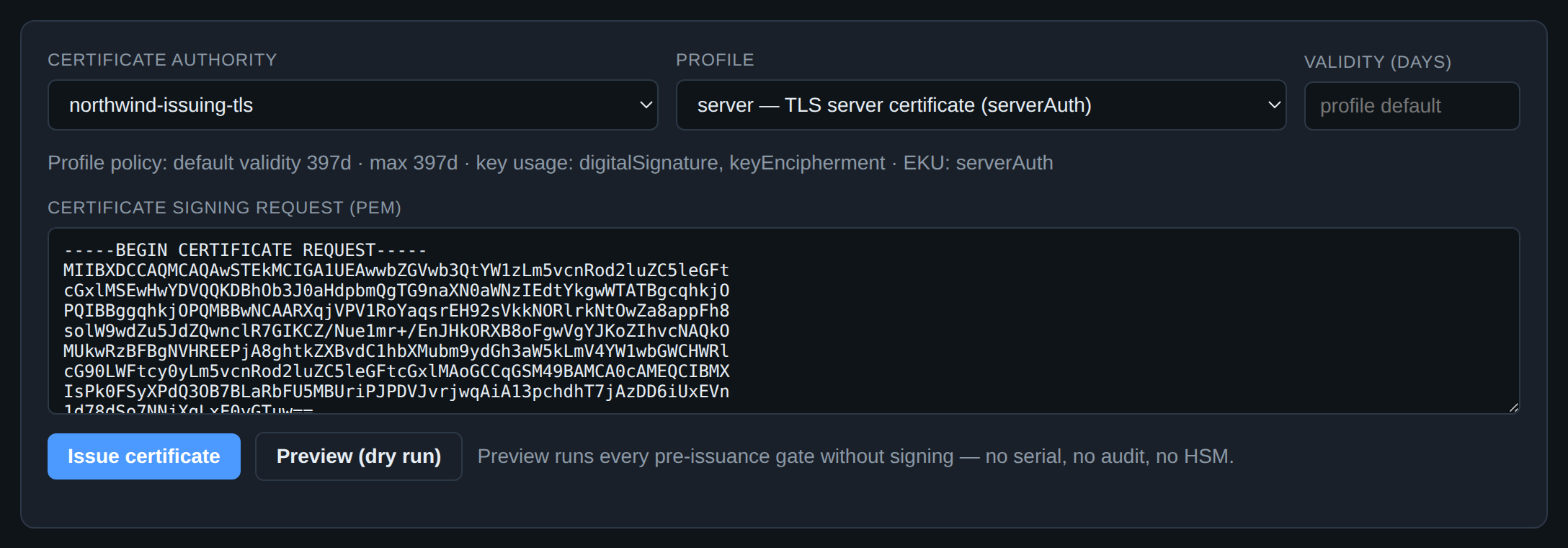
Issuance takes a CSR, a CA and a profile — and the profile is the part worth understanding, because it is where policy lives rather than in the request.
A profile fixes the key usages, the extended key usages, the maximum validity
and which per-request overrides are even offered. The grey profile policy
line under the pickers is that policy, restated for the profile you just chose,
before you submit anything: 397 days maximum, digitalSignature and
keyEncipherment, serverAuth. A request asking for more is refused; a request
asking for less gets less.
This is also why the form changes shape as you pick: a UPN field appears only for smartcard-logon profiles, an OCSP Must-Staple override only where the profile permits one, a PSD2 authorization group only on a qualified profile. Controls that would be rejected are not rendered, so the form cannot be used to build a request the gates will throw away.
Note what the form does not take: a private key. The subject generates its own key and sends a CSR. (When the subject genuinely cannot — a device enrolling by hand, an S/MIME recipient — the PKCS#12 page generates a key server-side and hands back a password-protected bundle, which is a different trade-off, deliberately on a different page.)
5. Dry-run it first
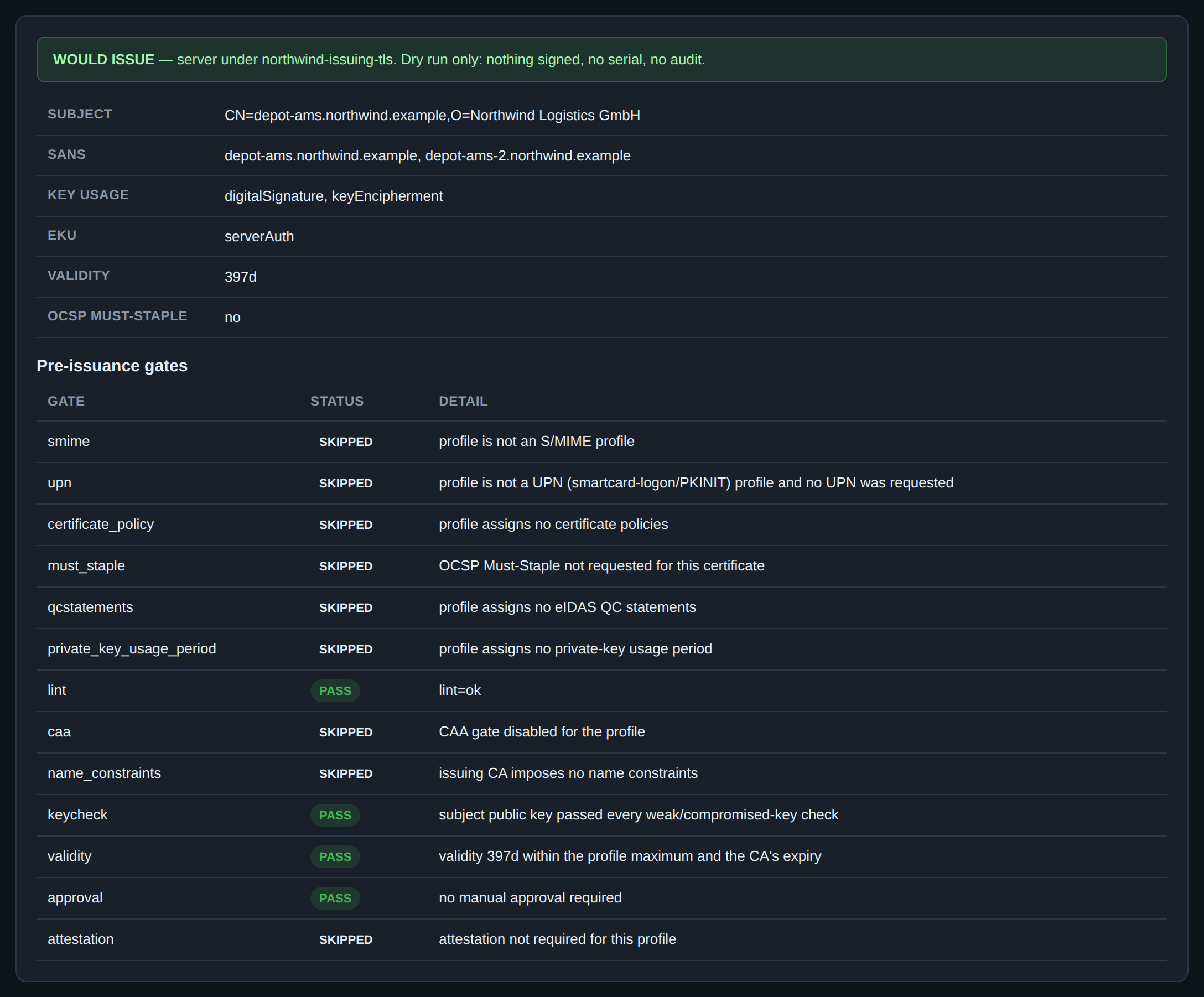
Preview (dry run) runs the entire pre-issuance gate stack and stops short of the signature. No serial is allocated, no audit event is written, the HSM is never asked for anything. The result is the certificate that would exist and the verdict of every gate that would have had to pass.
Read it as two halves. The top is the resolved leaf — what the profile and
your request combined to, including the fields you did not supply. The bottom is
the gate ledger, and SKIPPED there is as informative as PASS: "CAA gate
disabled for the profile" and "issuing CA imposes no name constraints" are
each telling you a control is not in force, which is sometimes the finding.
Use it in the two situations where issuing to find out is expensive: when you
have just changed a profile and want to know what it now does, and when a
request is being refused and the error alone does not say which of a dozen
gates refused it. secsy-ca issue -dry-run is the same thing from a terminal;
the full gate list is in pre-issuance preview.
6. The issued estate
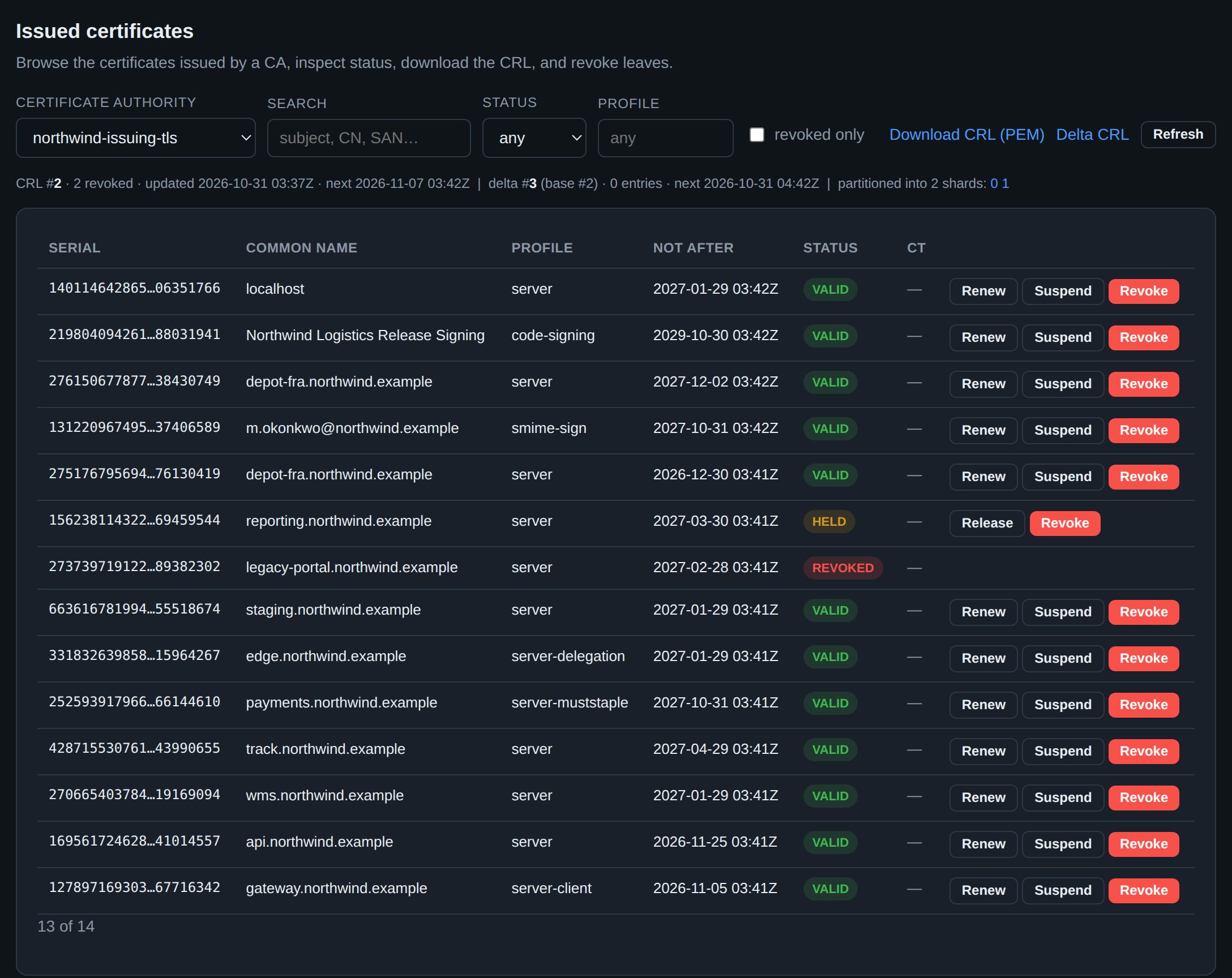
This is the page you live on. One CA at a time, server-side filtered and paged — the table is keyset-paginated with a Load more action rather than loading an estate of a hundred thousand certificates into a browser tab.
The strip above the table is the CRL, and it is the part operators forget to
look at. It names the current CRL number, how many entries it carries, when it
was regenerated and — the one that matters — when it next will be. A relying
party that fetches a stale CRL fails open or fails closed depending on its own
configuration, neither of which you chose. If next is in the past, revocation
is not being published and that is an incident, not a cosmetic issue. The delta
CRL and the per-shard links are beside it, for the estates large enough to need
partitioned CRLs.
The per-row actions are the lifecycle, and the distinction between two of them is the one to get right:
- Revoke is permanent. RFC 5280 gives no way back, and the reason code you
pick is published to every relying party. Choose it deliberately —
keyCompromiseis a statement about the subject's key,supersededandcessationOfOperationare statements about the service. - Suspend places the certificate on hold (
certificateHold) and is reversible: the row gains a Release button, which emitsremoveFromCRLin the next delta CRL and returns it to service. Reach for this when you suspect rather than know — a host that has stopped responding, a laptop reported missing an hour ago. - Renew issues a replacement with a fresh serial, leaving the old one in
place and valid until it expires. It is not an edit; both exist. (The two
depot-fra.northwind.examplerows above are exactly that — a renewal and its predecessor.)
7. When a key is compromised
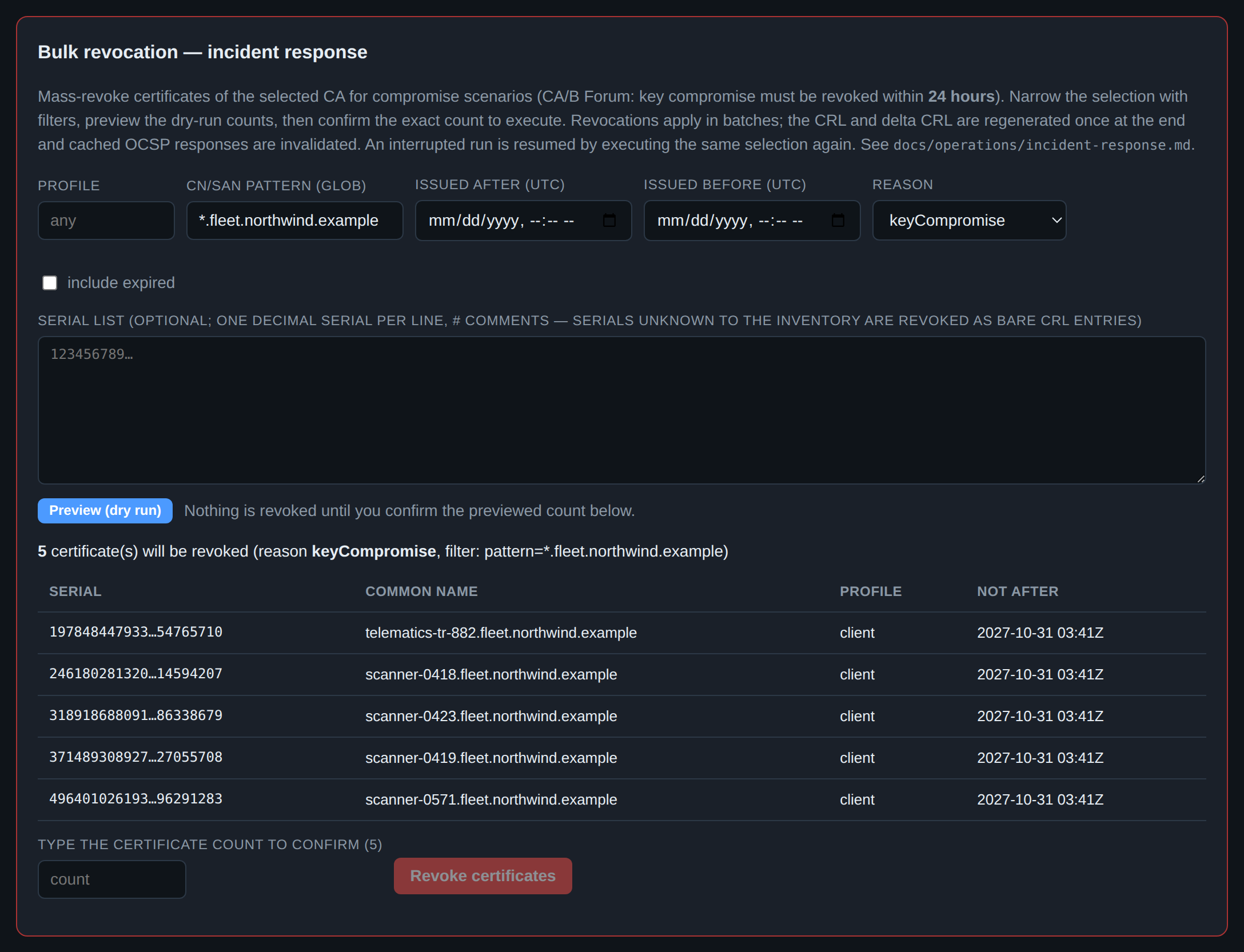
Revoking one certificate is a button. Revoking the certificates of an entire device fleet, against the CA/Browser Forum's 24-hour clock, at three in the morning, is where mistakes get made — so this panel is built to be slow in exactly one place.
The selection is a filter: profile, a CN/SAN glob, an issuance window, and optionally a pasted list of serials (including serials the inventory has never seen, which is how you revoke certificates an attacker issued with a stolen CA key — they go onto the CRL as bare entries).
Then the contract. Preview (dry run) reports the count and a sample, and nothing happens. To proceed you must type that exact count into the confirmation field. A filter that matched 4,000 certificates when you expected 5 cannot be executed by muscle memory, because the number you have to type is the number the preview actually found, and if those disagree you stop.
Execution is batched and resumable: re-running the same selection after an interruption continues rather than duplicating. The CRL and delta CRL are regenerated once at the end, not per certificate, and the cached OCSP responses are invalidated — so the propagation you care about happens once and completely. The full procedure, including how to verify propagation afterwards, is incident response: mass revocation.
8. What breaks next
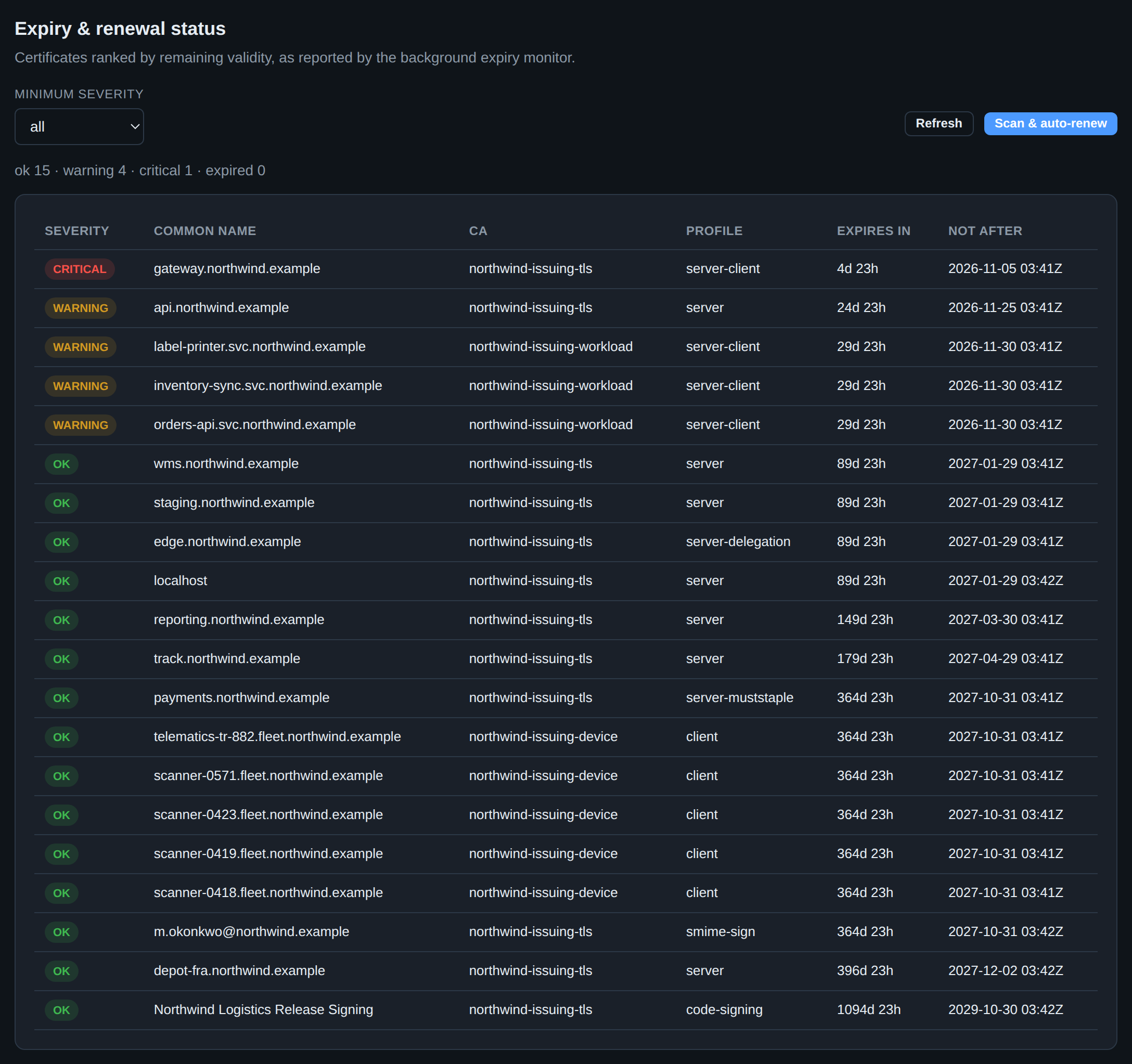
The expiry monitor is a background job; this page is its output, ranked by the
only column that matters operationally — time left, not expiry date. The
counters at the top are the whole fleet in one line, and the two bands are
configurable (monitor.warning_days, monitor.critical_days).
Scan & auto-renew runs a scan immediately and, for profiles listed in
monitor.renew_profiles, renews what is inside the renewal window. The reason
auto-renewal is opt-in per profile rather than global is that renewal is only
safe when something will deploy the result; a certificate renewed into the
database while the server keeps serving the old one has fixed nothing. Wire the
delivery first — ACME, the enrollment agent, or your own automation against the
API — then enable it for those profiles.
The same information reaches a pager through the monitor's notification sinks and the Prometheus metrics; this page is for looking, not for finding out. See expiry monitoring and auto-renewal.
9. Across every CA
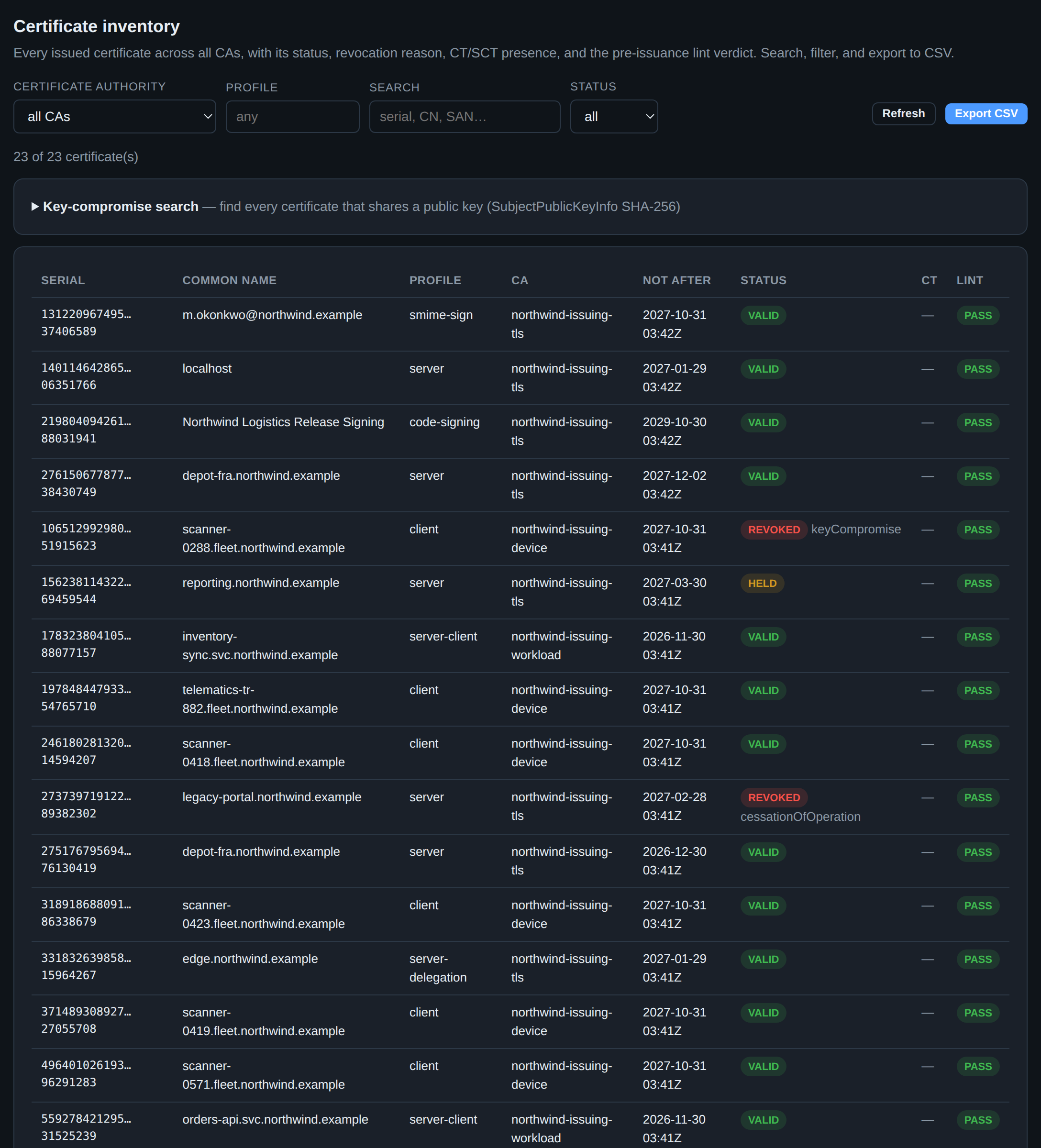
Certificates is per-CA; Inventory is the whole deployment at once, which is what you want when the question is about a name rather than about an issuer. It adds two columns the per-CA view does not carry: whether the certificate has CT SCTs, and its lint verdict. Export CSV takes the current filter, not the whole table.
The collapsed panel at the top is the one to remember before you need it.
Key-compromise search takes a SubjectPublicKeyInfo SHA-256 fingerprint — or
a pasted public key, which your browser fingerprints locally — and finds every
certificate across every CA that shares that key. When a private key leaks, the
blast radius is not "the certificate in the ticket"; it is every certificate
ever issued over that key, possibly under several names and several CAs. This
finds them and hands you the ready-to-run revoke-bulk command for the set.
10. Prove a chain
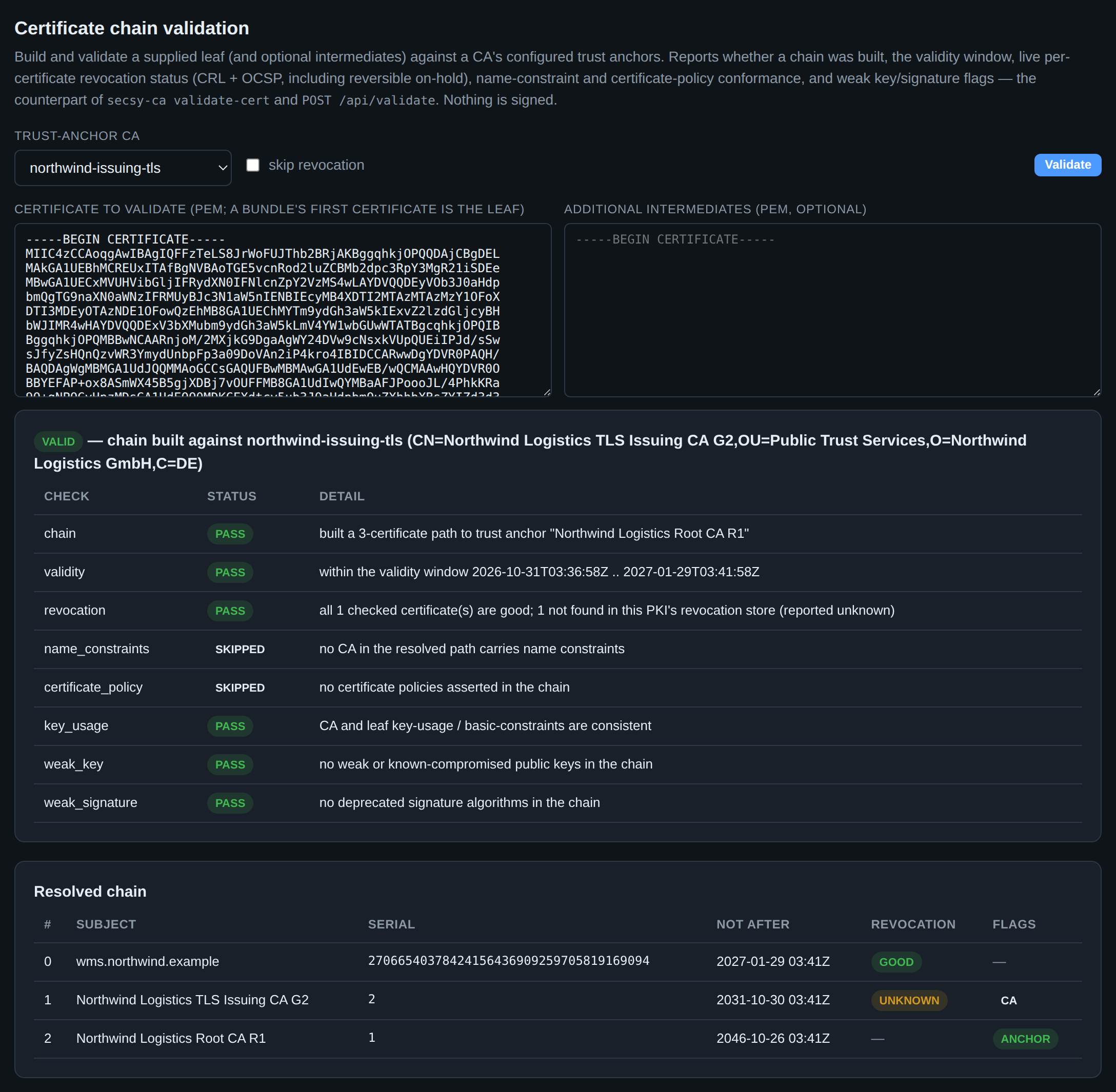
Validate answers "would a client accept this?" without involving a client. Paste a leaf, pick the trust anchor, and get a structured verdict instead of an opaque success or failure: the path it built, the validity window, live CRL and OCSP revocation status per certificate in the chain, name-constraint and certificate-policy conformance, and weak-key or weak-signature flags.
Nothing is signed and nothing is stored, which makes it the right first tool for
a support question. The three things it catches that eyeballing a certificate
does not: a chain that cannot actually be built (the intermediate your server
serves is not the one that signed the leaf), a revocation status that is
unknown rather than good because the responder is not reachable, and a
certificate that is valid today and will not be in a week. The Resolved chain
table is where to look when the verdict surprises you — it names every
certificate the path builder chose and flags which one is the anchor.
Full semantics in chain and path validation.
11. What a relying party needs
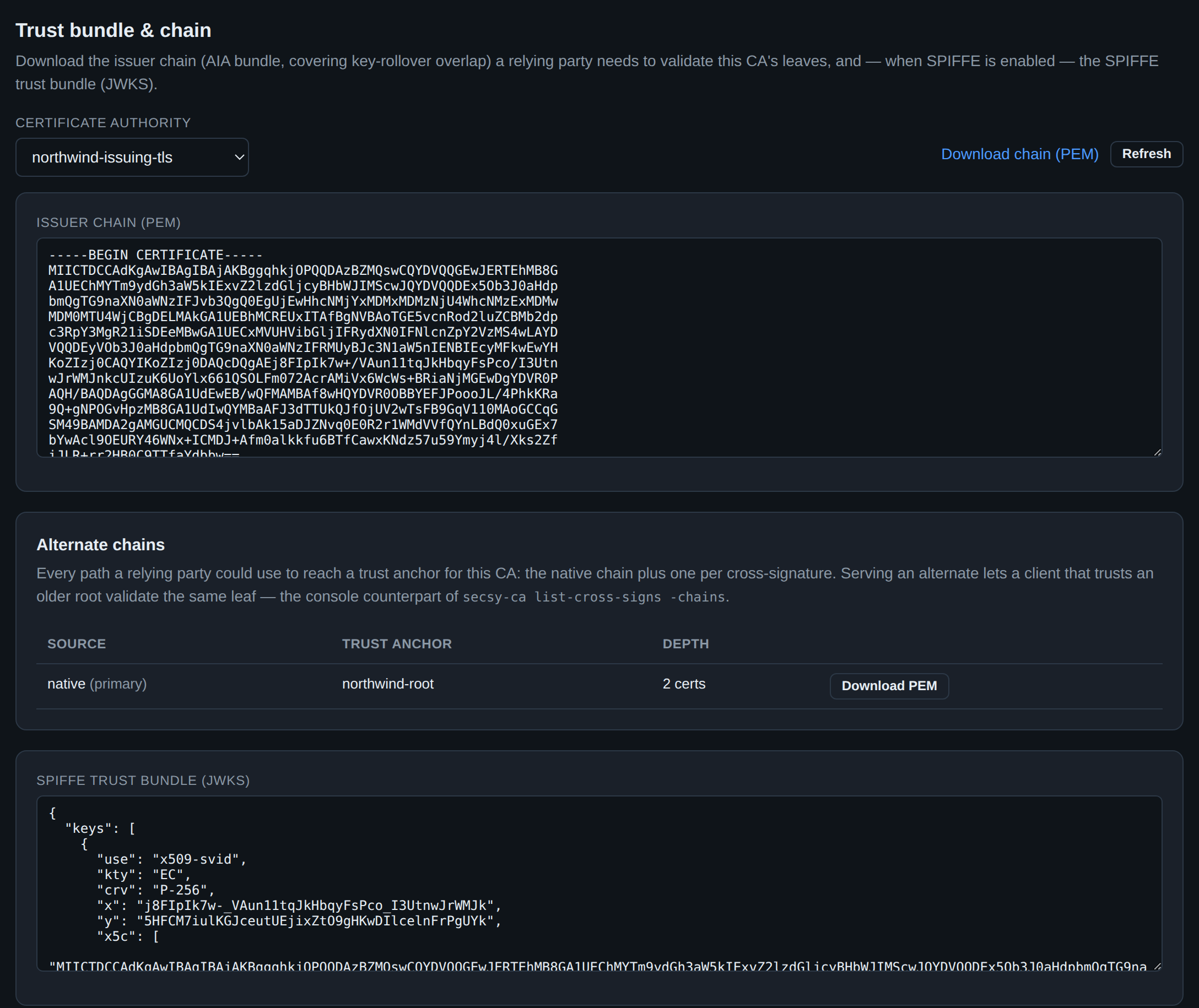
This is the page you send people to, rather than pasting certificates into a chat. It serves the issuer chain a relying party needs to validate this CA's leaves, kept correct across a key rollover — during an overlap window the bundle contains both the old and the new issuer, which is the entire point of the overlap.
Alternate chains is the panel that matters during a root transition. A cross-signed CA can be reached by more than one path to more than one trust anchor, and which path you serve decides whether an old client succeeds. Each row is one such path, with its anchor and depth, downloadable separately: serve the alternate to the clients that trust only the older root, serve the native chain to everyone else. With no cross-signatures configured — as here — there is exactly one row, and that is the correct answer rather than an empty state.
Below it, when SPIFFE is enabled, the JWKS trust bundle and the X.509-SVID and JWT-SVID minters for workload identity.
12. The other CA: SSH
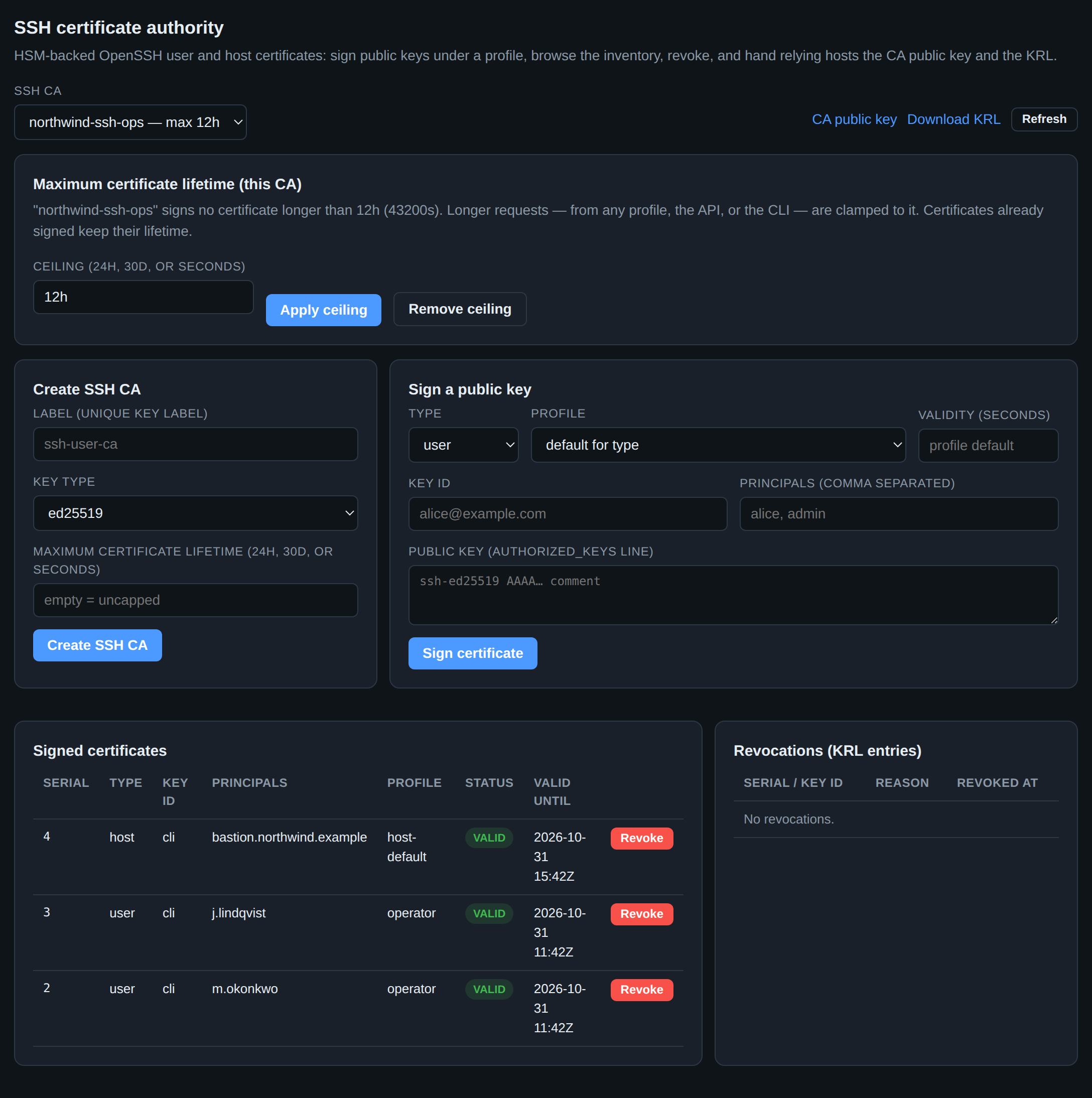
OpenSSH certificates are not X.509 and do not appear anywhere in the pages above
— but they are signed by a key in the same token, under the same RBAC, into the
same audit log. If you run SSH at any scale this page replaces
authorized_keys management entirely: hosts trust the CA's public key once, and
access becomes a matter of who holds a current certificate.
The mechanics are the same shape as X.509 with different words. A profile
fixes the certificate type, the validity bounds, which principals may be
requested and which extensions and critical options are permitted — so an
operator profile can allow 8-hour certificates with a PTY while a ci-deploy
profile allows 15 minutes, no PTY, and principals matching deploy-* only.
Sign a public key takes an authorized_keys line, not a CSR, because that
is what SSH has.
Above those forms is the one control that is not per-profile: the CA's
maximum certificate lifetime. A profile bounds the certificates signed under
it; this bounds every certificate signed by this key, whichever profile or
endpoint asked — including the profile's own default, which is why the host
certificate above expires in 12 hours rather than the 90 days host-default
would otherwise grant. Tighten it here and the next signature is shorter;
certificates already signed keep what they were signed with, so a tightening is
a policy change, not a revocation.
Revocation is the KRL rather than a CRL: revoke a certificate here and
download the KRL for your hosts' RevokedKeys. The validity windows are the
real control — the two user certificates above expire the same day they were
issued — and the KRL is the backstop. SSH CA reference.
13. What a signing request may ask for
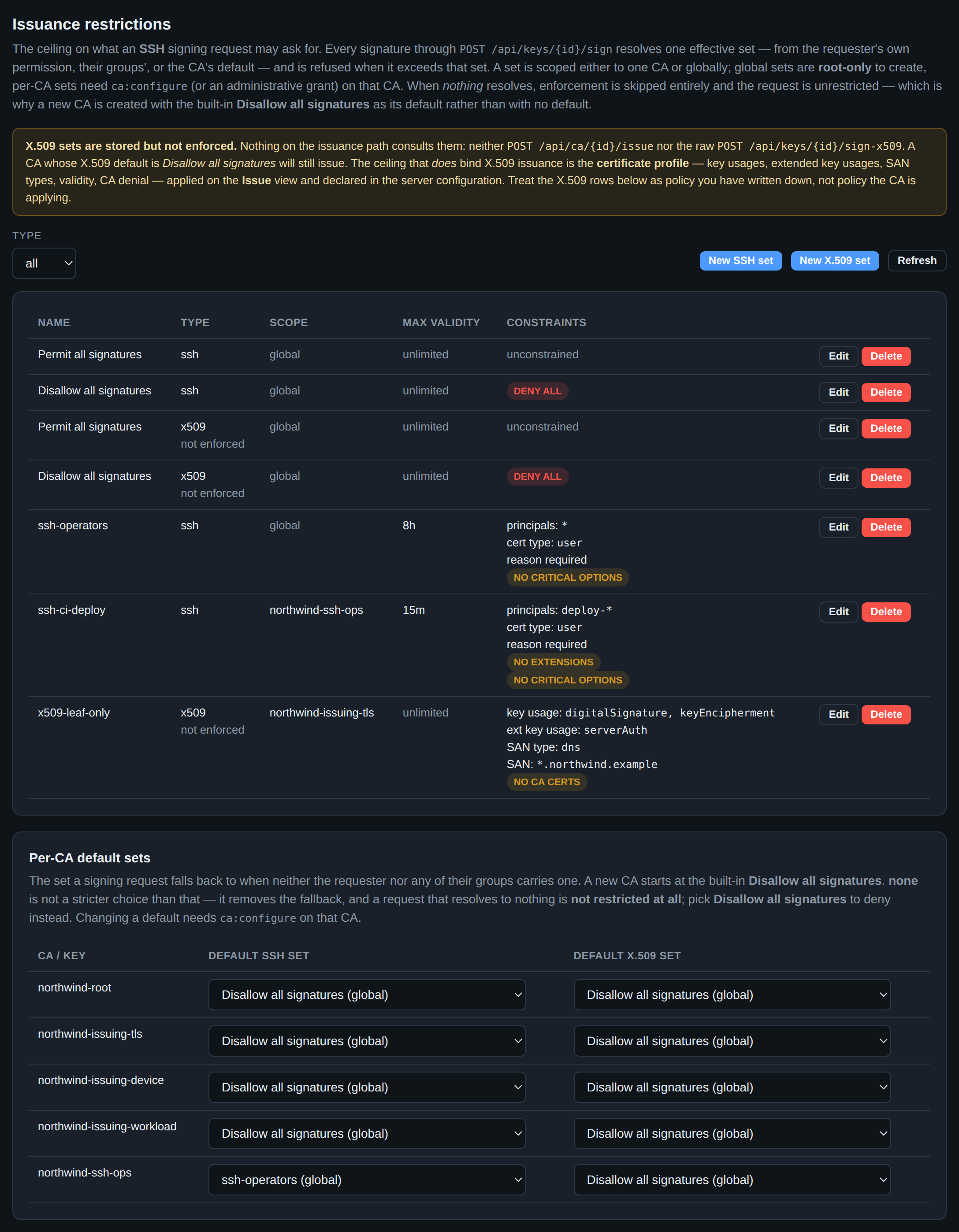
The page before this one put a ceiling on a whole CA. Restrictions puts one
on a requester — and it is the only stop on this walk with no secsy-ca
equivalent. Restriction sets are administered through this view and the API or
not at all, which inverts the relationship the rest of this document relies on.
Three ceilings now stand between a request and a signature, and they compose by taking the smallest: the profile bounds what may be asked for, the CA's maximum lifetime from section 12 bounds every signature made by that key, and the effective restriction set bounds this requester.
A restriction set enforces in two different ways, and the difference decides
what a caller sees. Asking for something the set does not permit — a principal
outside the list, the wrong certificate type, a custom extension or a critical
option under a deny, or anything at all under deny all — is refused, 403,
nothing signed. Asking for too long a lifetime is not refused but silently
clamped to the cap, exactly as the CA ceiling clamps. So a CI job that asks
ssh-ci-deploy for 24 hours does not fail; it gets a 15-minute certificate and
has to be built to re-request, which is the behaviour you want but not the one
"refused when it exceeds that set" leads you to expect.
Which set is "effective" is a resolution, and its order is worth knowing because
only the last step is visible here: the requester's own permission, then their
groups', then the CA default in the table at the bottom. The policy above is
the usual shape — a permissive global set for humans (ssh-operators: 8h, user
certificates, a reason recorded in every key ID) and a far tighter per-CA one for
machines (ssh-ci-deploy: 15 minutes, principals matching deploy-*, no
extensions, no critical options).
The dangerous setting is the one that reads as cautious. When nothing
resolves, enforcement is skipped entirely and the request is unrestricted — so
setting a CA's default to none does not deny signing, it stops checking.
The deny is the built-in Disallow all signatures, which is also what a new CA
starts with. Reach for that one; none is a hole.
The banner at the top is not boilerplate either. The X.509 half of this page is
stored and enforced by nothing: no issuance path consults it — not
POST /api/ca/{id}/issue, not the raw /api/keys/{id}/sign-x509 — so the
x509-leaf-only row above constrains precisely nothing, and a CA whose X.509
default is Disallow all signatures will still issue. What binds X.509 is the
certificate profile from section 4 — and the page below.
Restrictions reference.
The ceiling that does bind
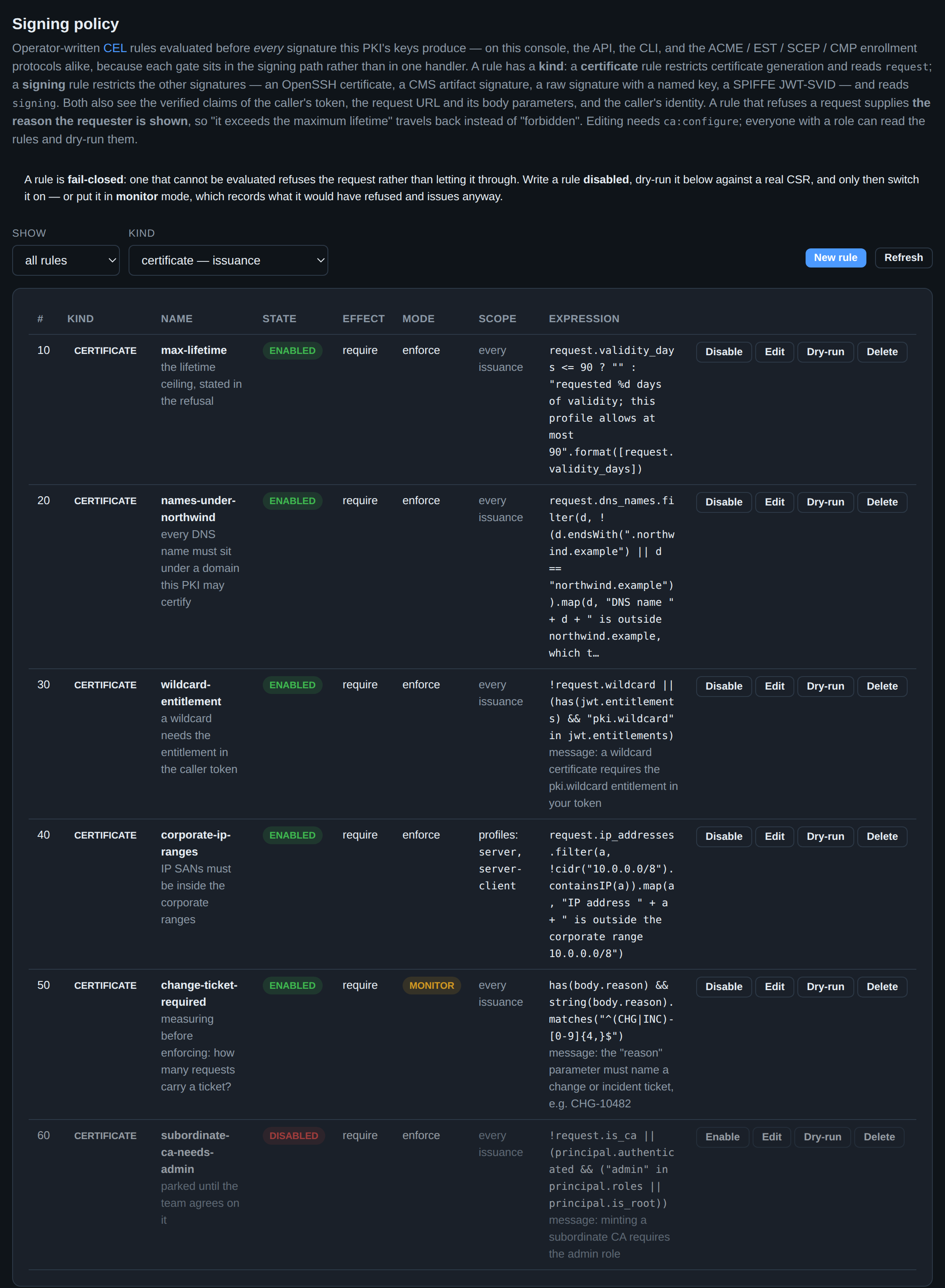
A profile fixes a shape: these key usages, that validity ceiling, those SAN types, the same for everyone. Signing policy is for the limits that are conditional — on who is asking, on what their token says, on what else is in the request — and that a field in a configuration file cannot express. The rules are CEL, they are evaluated before every signature on every path (this console, the API, the CLI, ACME/EST/SCEP/CMP), and they live in the database, so a rule written here applies to the next request with no restart.
The Kind column is the first thing to read. One table holds two kinds of
rule: a certificate rule gates certificate generation and reasons about
request; a signing rule gates everything else these keys sign — an OpenSSH
certificate, a release artifact, a raw signature — and reasons about signing.
The filter above the table is set to certificate for the shot above; the
signing half is two screenshots further down.
Read the max-lifetime row carefully, because it is the point of the feature. It
does not return true or false; it returns the sentence the requester is
shown:
request.validity_days <= 90 ? "" :
  "requested %d days of validity; this profile allows at most 90".format([request.validity_days])
An expression may yield a bool (the condition), a string (the reason itself, with
"" meaning satisfied), or a list of strings (one reason per offending name).
That is why a refusal from this engine comes back as "requested 1460 days of
validity; this profile allows at most 90" and not as 403 Forbidden.
The five rules above show the vocabulary: request (the certificate, as the
to-be-signed template — so the clamped validity and the profile's usages, not the
request JSON), jwt (the verified claims of the caller's token), url and
path (the request as an object), body (its parameters — change-ticket-required
reads a field the certificate does not carry), and principal (the caller's
roles and groups).
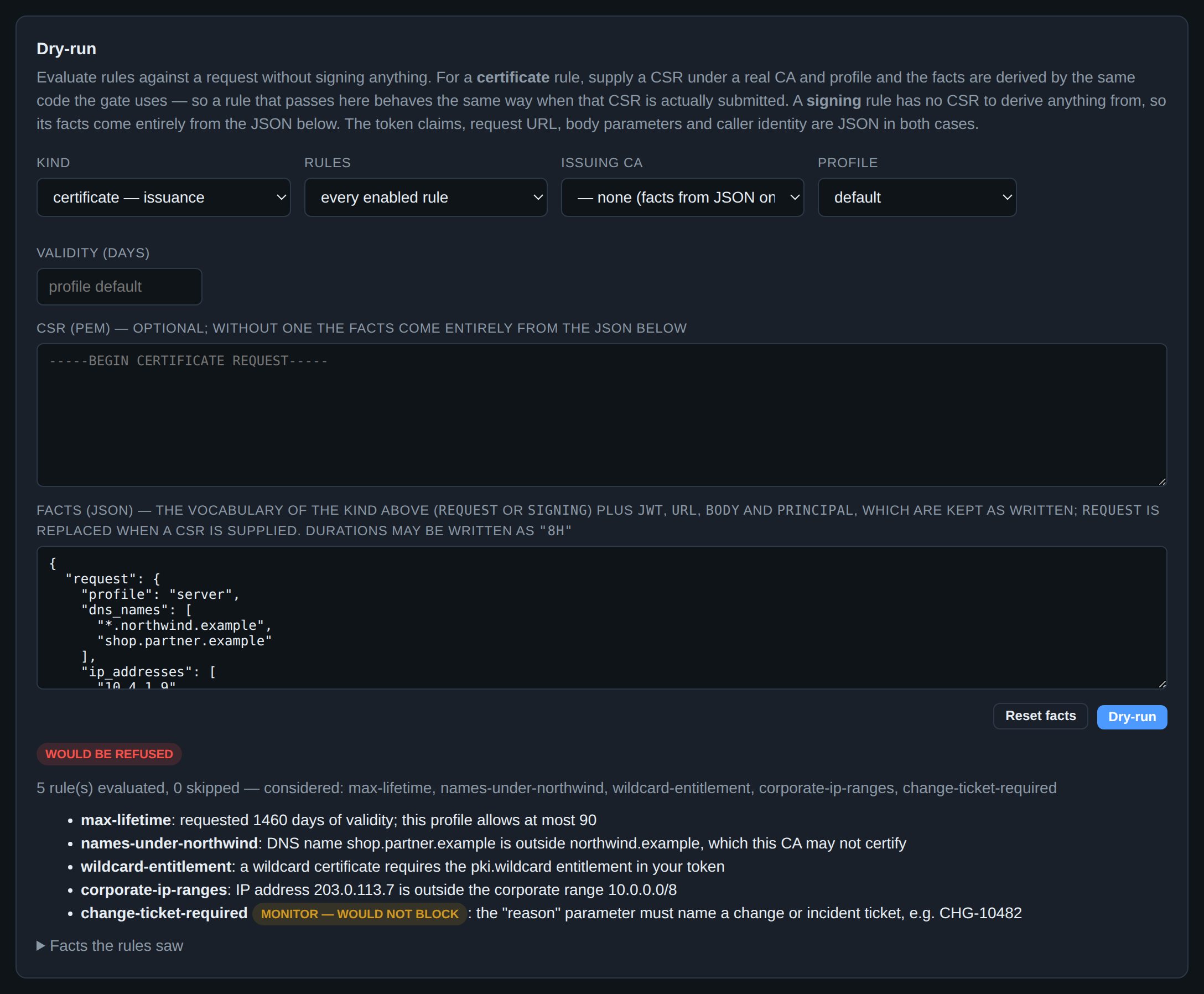
Do not write a rule straight into enforcement. A rule is fail-closed — one
that cannot be evaluated refuses the request rather than letting it through — so
a mistake here refuses every certificate under its scope. The two safe routes are
both on this page. Save the rule disabled (subordinate-ca-needs-admin
above) and dry-run it; or save it in monitor mode (change-ticket-required),
which records what it would have refused, in the decision and in the
cert.policy audit event, and issues anyway. Measure, then flip it to enforce.
The dry-run is the same evaluator the gate runs, and giving it a CSR under a real CA and profile derives the certificate facts through the same code — so a rule that passes here behaves the same way when that CSR is actually submitted. Note what the run above does for the requester: five rules, four reasons, one response. Someone who got four things wrong learns four things, instead of discovering them one failed request at a time.
Over the API that is an HTTP 422 — not 403, because the credentials were fine
and the request was not — carrying each reason as {rule, message}.
CEL issuance restrictions.
The same engine, in front of the signatures that are not certificates
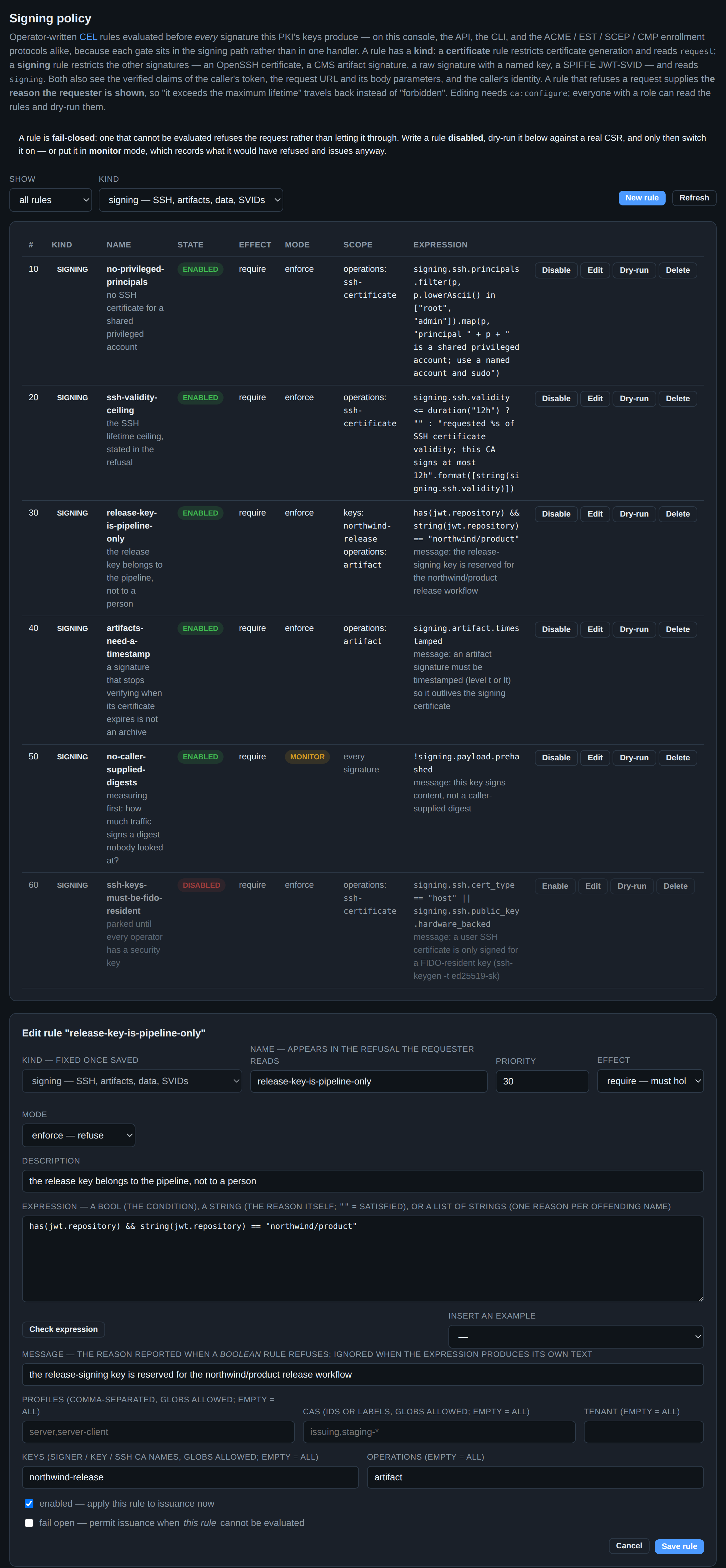
Nothing above is a second feature. It is the same table, the same editor, the same compile check, the same fail-closed reading and the same function library — pointed at the other signatures this HSM makes. Only the vocabulary differs, and the Kind selector in the editor switches it: the reference panel, the insertable examples and the compile check all follow it, and the Keys and Operations scope row appears, because a signing rule narrows by key and operation where a certificate rule narrows by profile and CA.
The two vocabularies are separate environments on purpose. A signing rule that
mentions request.dns_names does not compile; a certificate rule that mentions
signing.key.name does not compile either. A merged one would accept both and
then evaluate the wrong vocabulary against an empty object — a rule that reads
as working and in fact never fires. That is also why a rule's kind is fixed once
saved.
What the six rules are doing is worth a pass, because each is a thing no configuration field could say:
no-privileged-principals— no OpenSSH certificate forrootoradmin, on any CA, by anyone. The SSH profile can restrict principals by pattern; it cannot say "never these, everywhere".ssh-validity-ceiling— a lifetime ceiling that reports the duration it refused. On the real path the facts come from the resolved certificate — after the profile's defaults and after the CA's own ceiling — so a request the CA has already clamped is judged on what it was clamped to, not on what was asked for. (The dry-run below is hand-written facts, so there is nothing to clamp: it refuses the 24h it was given.)release-key-is-pipeline-only— the release key belongs to one repository's workflow token. A human with this console cannot use it at all.artifacts-need-a-timestamp— a CAdES-B signature stops verifying the day its certificate expires, which is not what "signed release" is supposed to mean.no-caller-supplied-digests— in monitor mode, measuring how much traffic asks this PKI to attest to bytes it never saw.ssh-keys-must-be-fido-resident— parked, because not every operator has a security key yet. An OpenSSHsk-key type is the one thing a public key proves about where its private half lives.
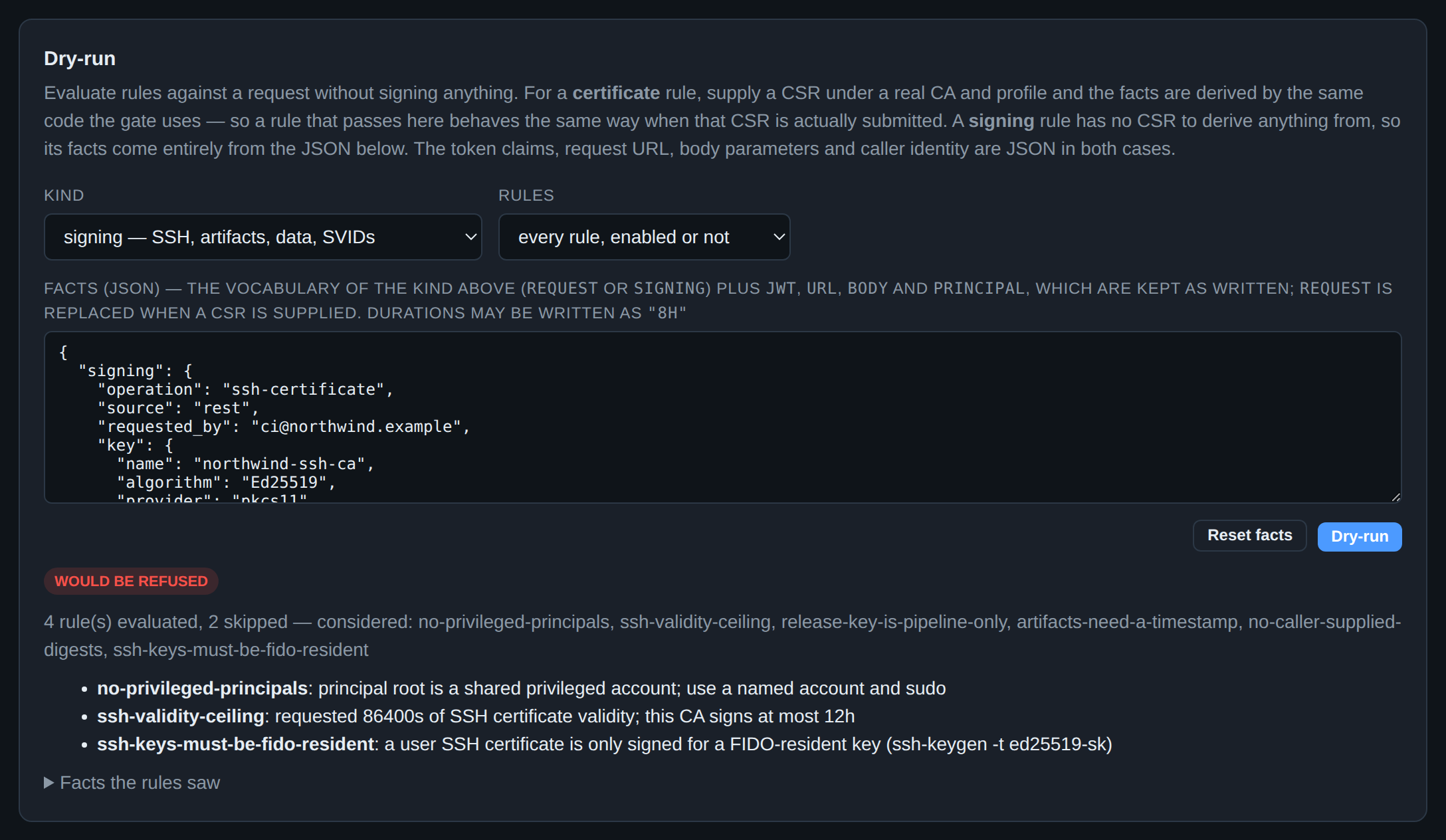
The dry-run has its own kind selector, and switching it replaces the fact set with that vocabulary's worked example — certificate facts in a signing dry-run would evaluate every rule against an empty signing request and report that nothing is refused, which is the one wrong answer this panel must not give. The CSR, CA and profile inputs disappear for a signing rule: there is no CSR whose resolution the server could replay, so the facts are the fact set.
A refusal here is the same HTTP 422 with the same {rule, message} list, on
POST /api/ssh/cas/{id}/sign, POST /api/sign and
POST /api/secret/signing-keys/{name}/sign alike — and on the CLI, because each
gate sits inside the service that owns the key rather than in a handler.
CEL signing restrictions.
14. Signing artifacts
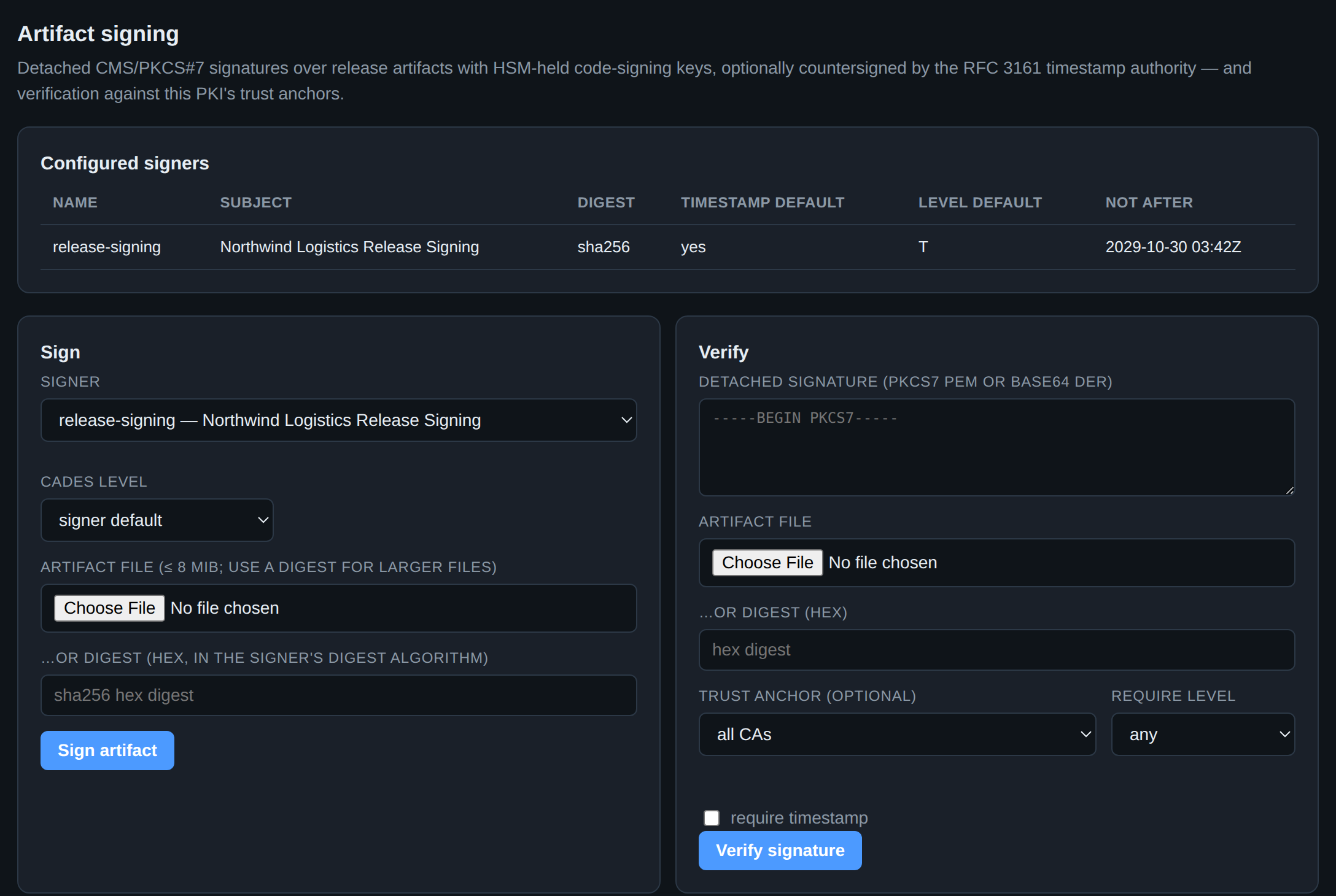
The same HSM that signs certificates signs release artifacts, as detached CMS/PKCS#7. The CAdES level column is the part to decide once and then stop thinking about:
| Level | What it adds | What it buys |
|---|---|---|
| B | signed attributes | a signature |
| T | + an RFC 3161 timestamp | proof it was signed before the key was revoked |
| LT | + embedded revocation material | verifiable after the signing certificate expires |
The jump from B to T is the one that matters, and it is why the signer above
defaults to T with timestamp: yes. Without a trusted timestamp, revoking a
compromised code-signing key invalidates every signature it ever made, including
the honest ones, because nothing establishes which came first. With one, the
signatures made before the compromise still verify. Choose LT for anything
that must still verify in ten years, when the signing certificate is long
expired and the CRL that covered it is gone.
Verify is the other half, and the require level and require timestamp
controls are what make it a gate rather than a formality: a release pipeline
that accepts any valid signature accepts a B signature made yesterday with a
key revoked last month. Artifact signing.
15. The other half: secrets
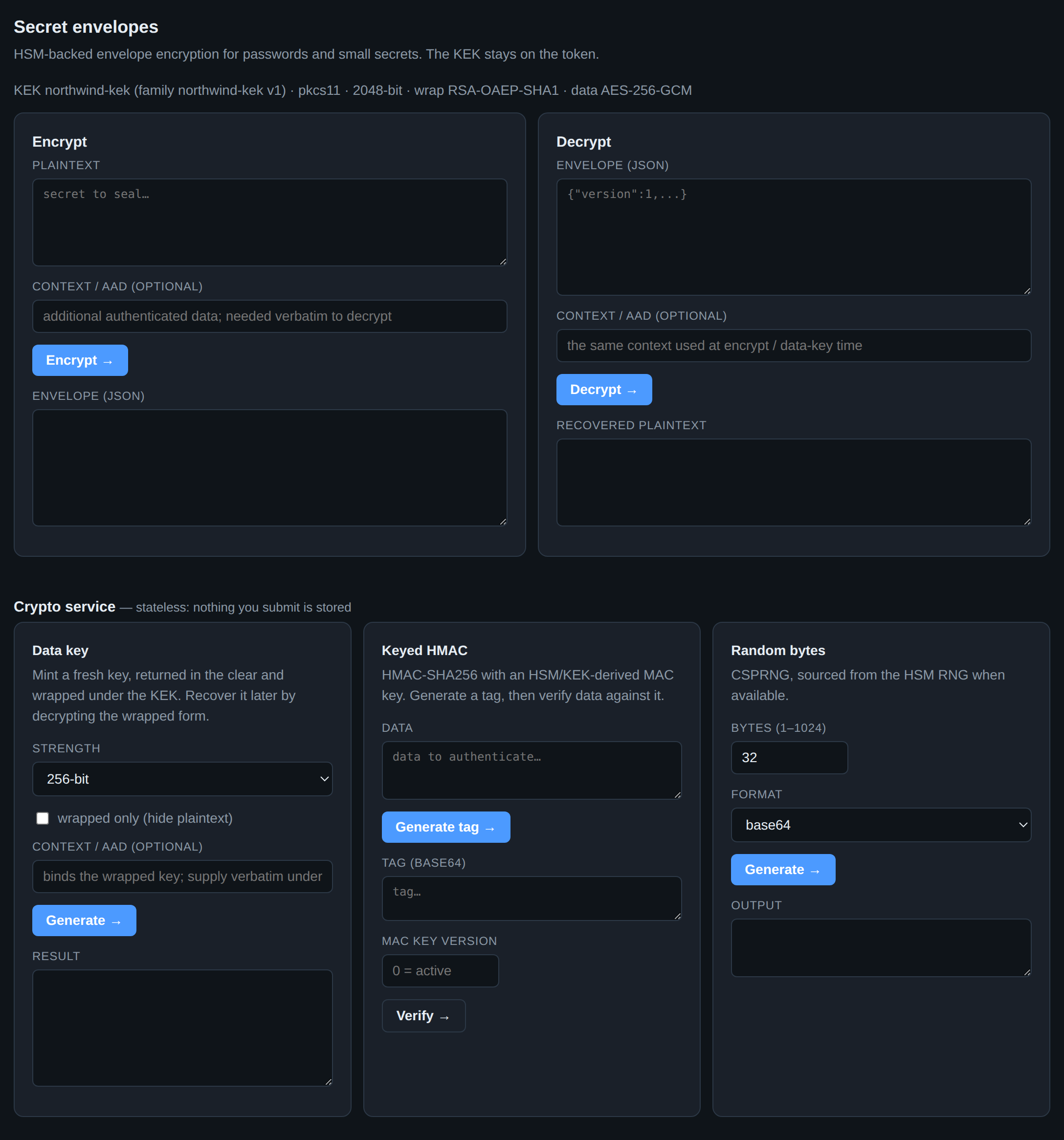
secsy-pki is a certificate authority and a password/data encryption service, and this is the second half. It is envelope encryption: a fresh AES-256-GCM data key per secret, that data key wrapped by an RSA KEK that never leaves the token. The status line names the KEK, its version and both algorithms, which is the whole cryptographic design in one line.
The consequence worth understanding: decryption requires the HSM, every time. An attacker who walks off with your database walks off with ciphertext and wrapped data keys and nothing else. The flip side is that the HSM is in the path of every decrypt, which is why the data key is AES — the HSM unwraps one small key, not your payload.
Context / AAD is the field people skip and then wish they had used. It binds a ciphertext to a context — a tenant, a record ID, an environment — and the exact same value is required to decrypt. Without it, a ciphertext lifted from one row and pasted into another decrypts happily; with it, that attack produces an authentication failure.
The Crypto service panels below are stateless and store nothing: mint a data key for client-side envelope encryption, compute and verify a keyed HMAC under an HSM-derived MAC key, or draw bytes from the HSM's RNG. Further down the page (not pictured) are named signing keys, FF1 tokenization, and the KEK rotation lifecycle. Secret encryption reference.
16. The stored-secret registry
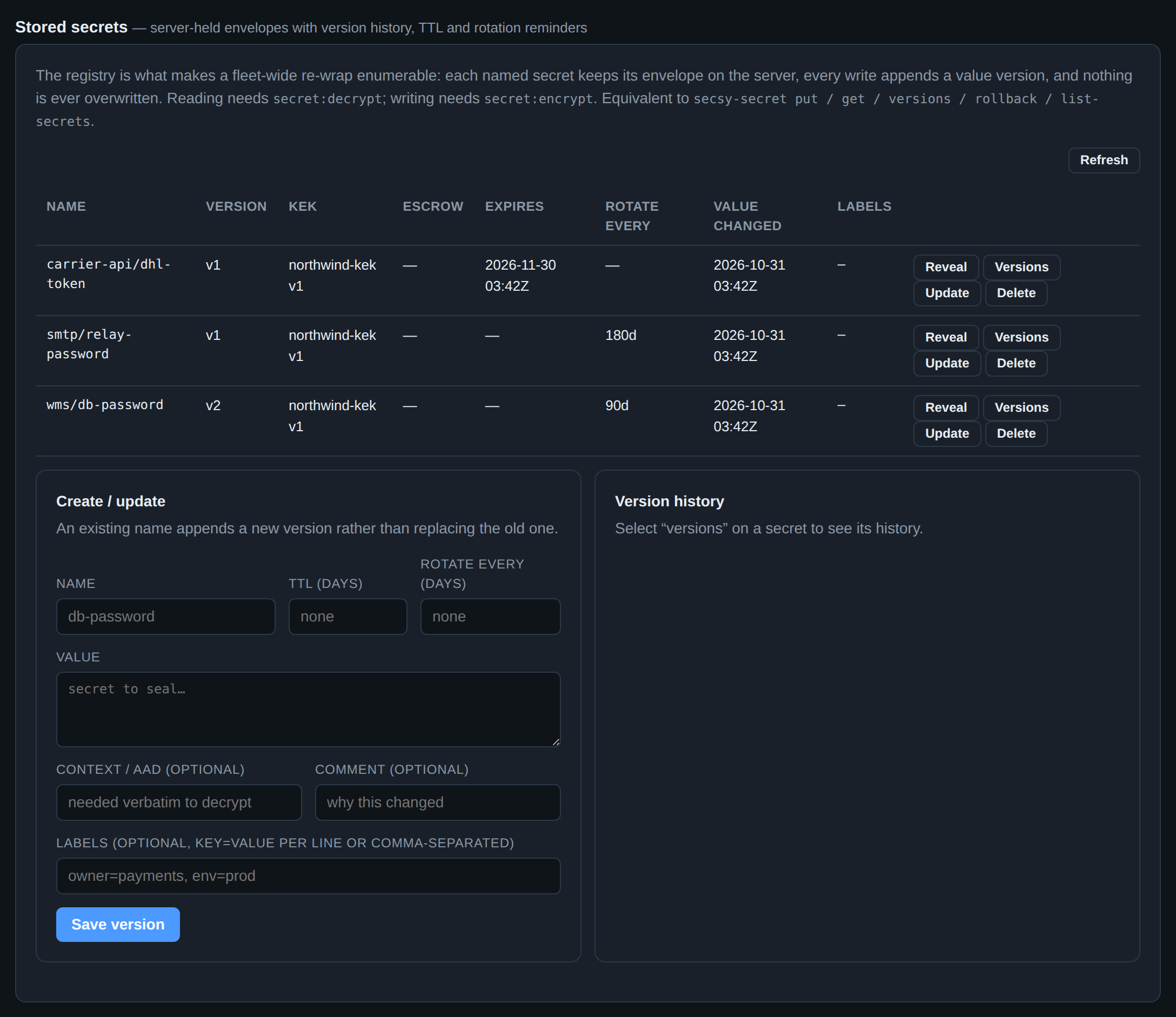
Encrypt/decrypt is stateless; this registry is the server holding the envelopes for you, and it changes what is possible in two ways.
Nothing is ever overwritten. Every write appends a version, and the old ones remain decryptable. So Versions shows the history, Reveal opens any version, and rollback makes an older value current by appending a copy of it — history is never rewritten. A rotation that broke production is undone in one click, not restored from a backup.
The estate becomes enumerable. Because the server knows which secrets exist and which KEK version each was wrapped under, a KEK rotation can re-wrap all of them and then tell you when retiring the old KEK is actually safe. An unenumerable pile of ciphertext in someone else's database cannot do that.
The Expires and Rotate every columns arm reminders rather than expiries — a secret past its date keeps working and shows up on the Lifecycle attention table below. The alternative, silently breaking production on a rotation deadline, is not better security.
17. The audit log
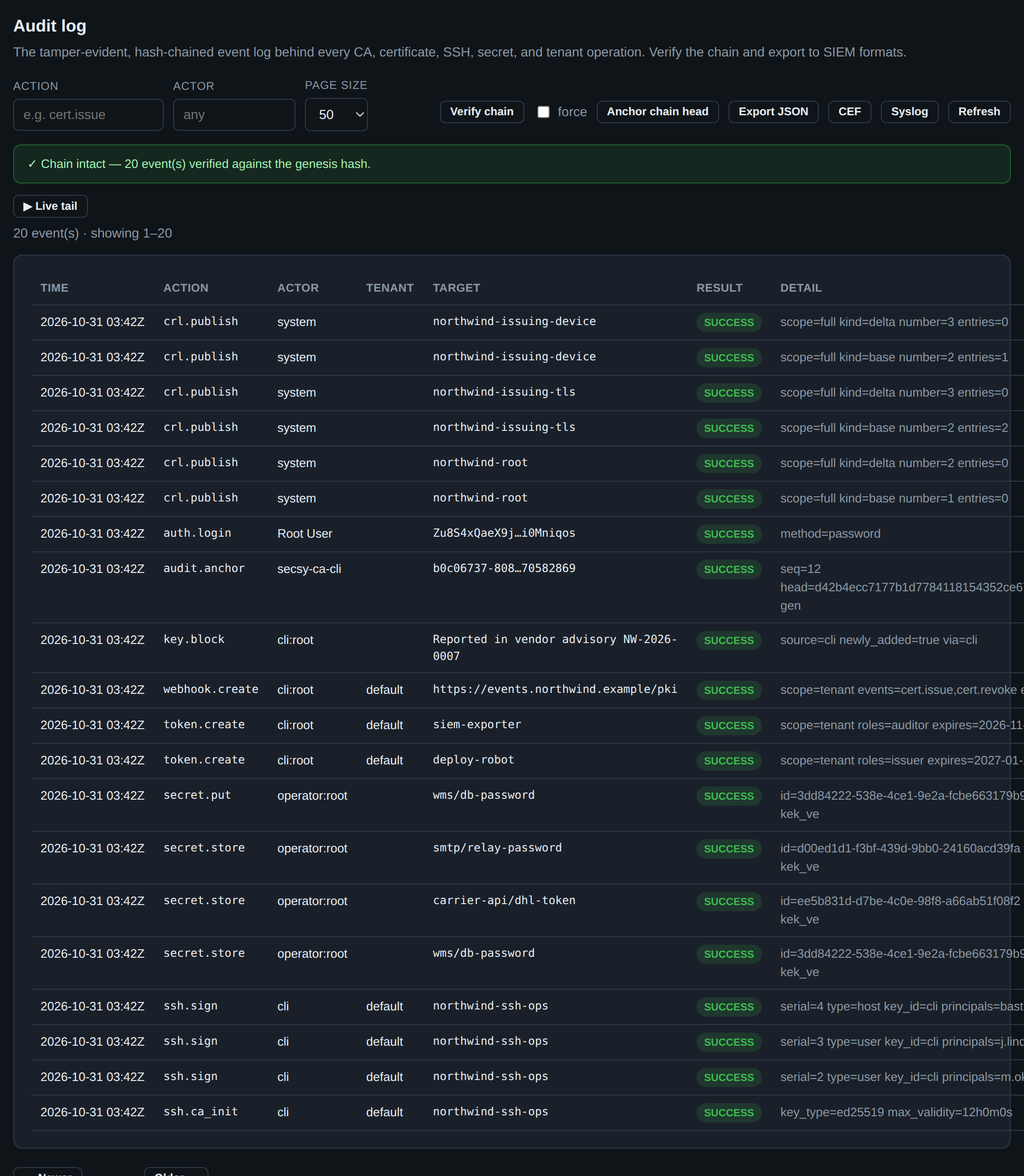
Every mutating operation in every page above wrote a row here, and the rows are hash-chained: each entry commits to its predecessor, so removing or editing one breaks every link after it. Verify chain re-walks the chain end to end and reports the first broken link, which is the difference between a log you keep and a log you can rely on.
A hash chain alone only proves internal consistency — an attacker who controls
the database can rewrite the whole chain from any point and recompute it.
Anchor chain head is the answer: it takes an RFC 3161 timestamp over the
current head and stores the token. A rewrite would have to produce a head that
matches an anchor signed by a third party at a time in the past, which it
cannot. The audit.anchor row in the screenshot is that operation recording
itself.
Export JSON / CEF / Syslog are the SIEM formats, and Live tail streams events over SSE as they happen. Getting the log off this machine is the point: a tamper-evident log that an attacker can delete is a log you will discover is missing. See audit and SIEM export.
Below the fold — past the bottom of the screenshot — are two older tables the
chain supersedes but does not contain: the signing-operation log, one
row per certificate signed through POST /api/keys/{id}/sign with the
restriction set that admitted it (section 13), and the HTTP access log of
method, path, status and source IP. Neither is hash-chained, so neither carries
the guarantee the view above it does. They are there because the event log began
later than the server did, and an incident that predates it still has to be
answerable.
18. Delegating one CA
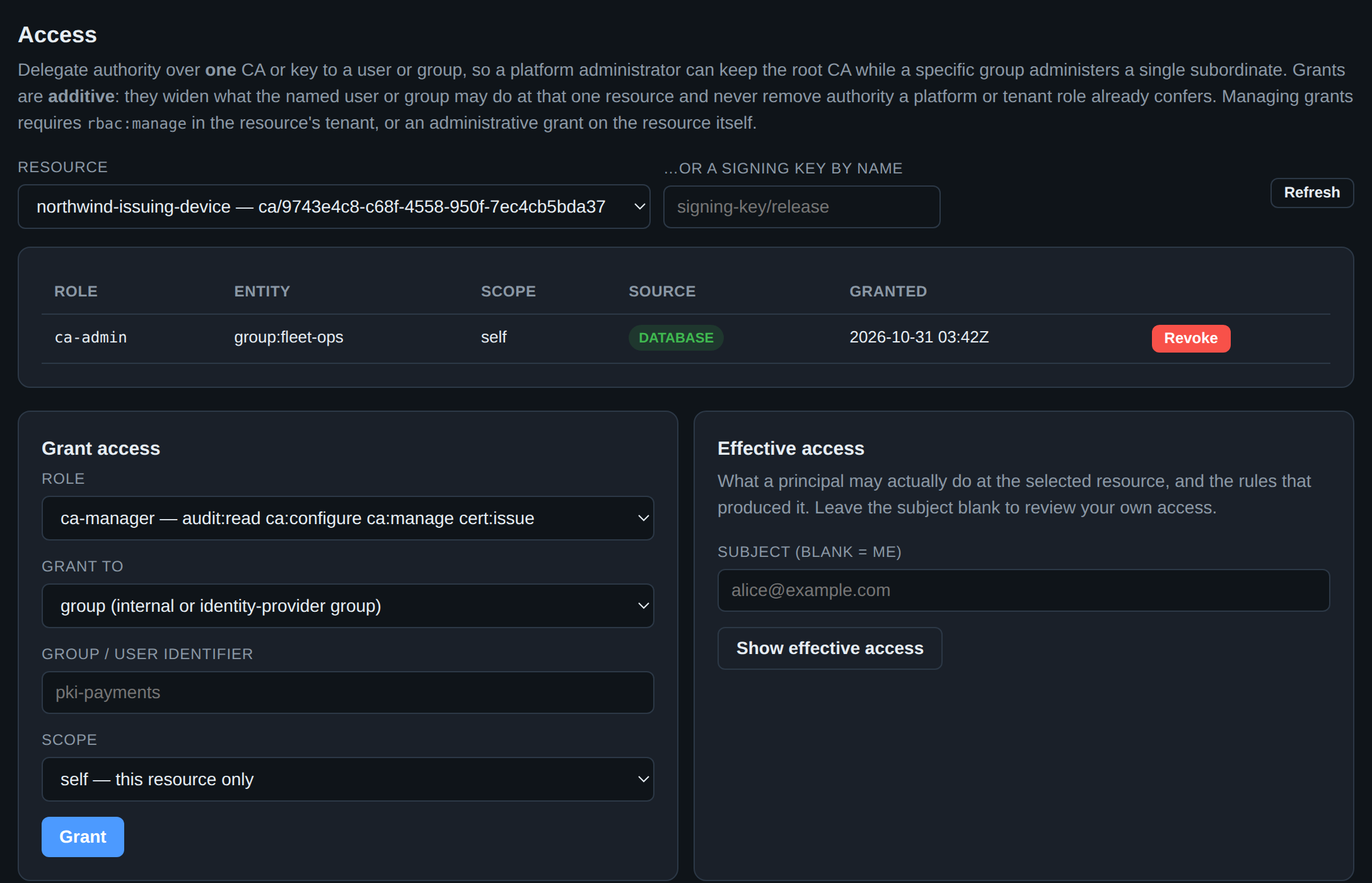
Tenant-wide roles are too coarse for the common ask: let the fleet team run the
device CA, and keep them away from the root. Access is per-resource
delegation, and the row above is exactly that — the group fleet-ops holds
ca-admin on the device issuing CA alone.
Three properties make it safe to hand out:
- Grants are additive. They widen what a principal may do at one resource. Nothing here can take away authority a platform or tenant role already confers, so a grant cannot be used to lock an administrator out.
- Scope is explicit.
selfis this CA only;subtreeis this CA and every CA created beneath it later. Pickselfunless you mean to delegate a branch. - Roles are capability sets, printed in the picker.
ca-managerreadsaudit:read ca:configure ca:manage cert:issueright there in the dropdown, so you are not granting a word whose meaning you have to go and look up.
Effective access answers the question the other way round — what may this person actually do here, and which rule produced that? — which is the one you need during an access review, or when someone insists they should be able to do something and cannot. Per-resource grants.
19. Machine callers
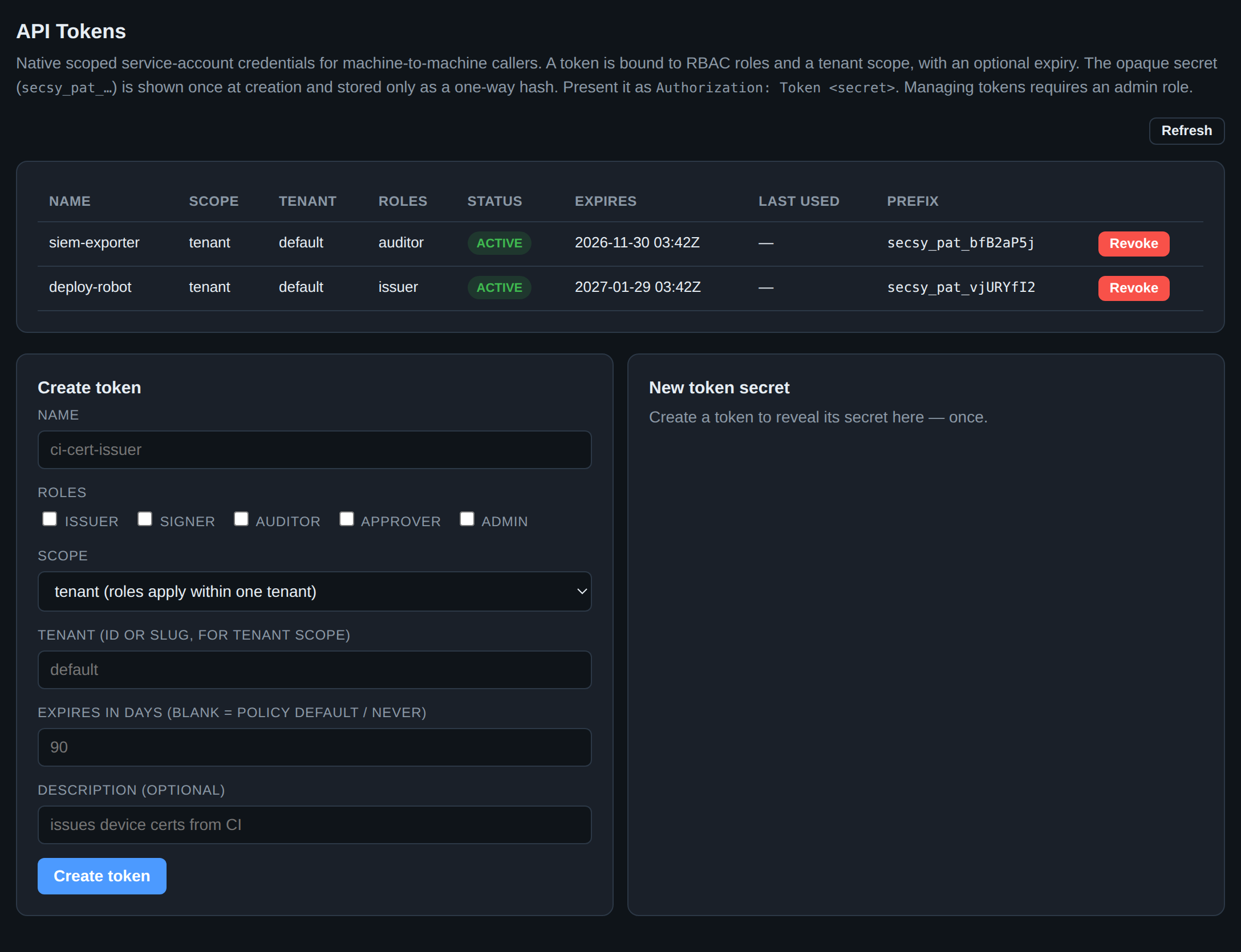
Automation should not hold an operator's password, and it should not hold root.
A token is a service account: a name, a set of roles, a tenant scope, an
expiry.
Note what the two tokens above are not. Neither is an admin. The SIEM exporter
holds auditor — it can read the audit log and nothing else, which is all a log
shipper has ever needed. The deployer holds issuer — it can request
certificates and cannot revoke them, rotate a CA or read a secret. Issue the
narrowest role that works, because a token is a credential that will end up in
a CI configuration, and the blast radius of one that leaks is exactly the roles
you gave it.
The secret is shown once, at creation, and stored only as a one-way hash: there is no "show token" button anywhere, because there is nothing to show. Lose it and you mint another. The table keeps the prefix so you can tell which token a log line refers to without knowing the secret, and Last used tells you which ones are dead and can be revoked.
Set an expiry. auth.api_tokens.max_lifetime_days caps it by policy so "never"
cannot be chosen by accident. API tokens.
20. Compliance evidence
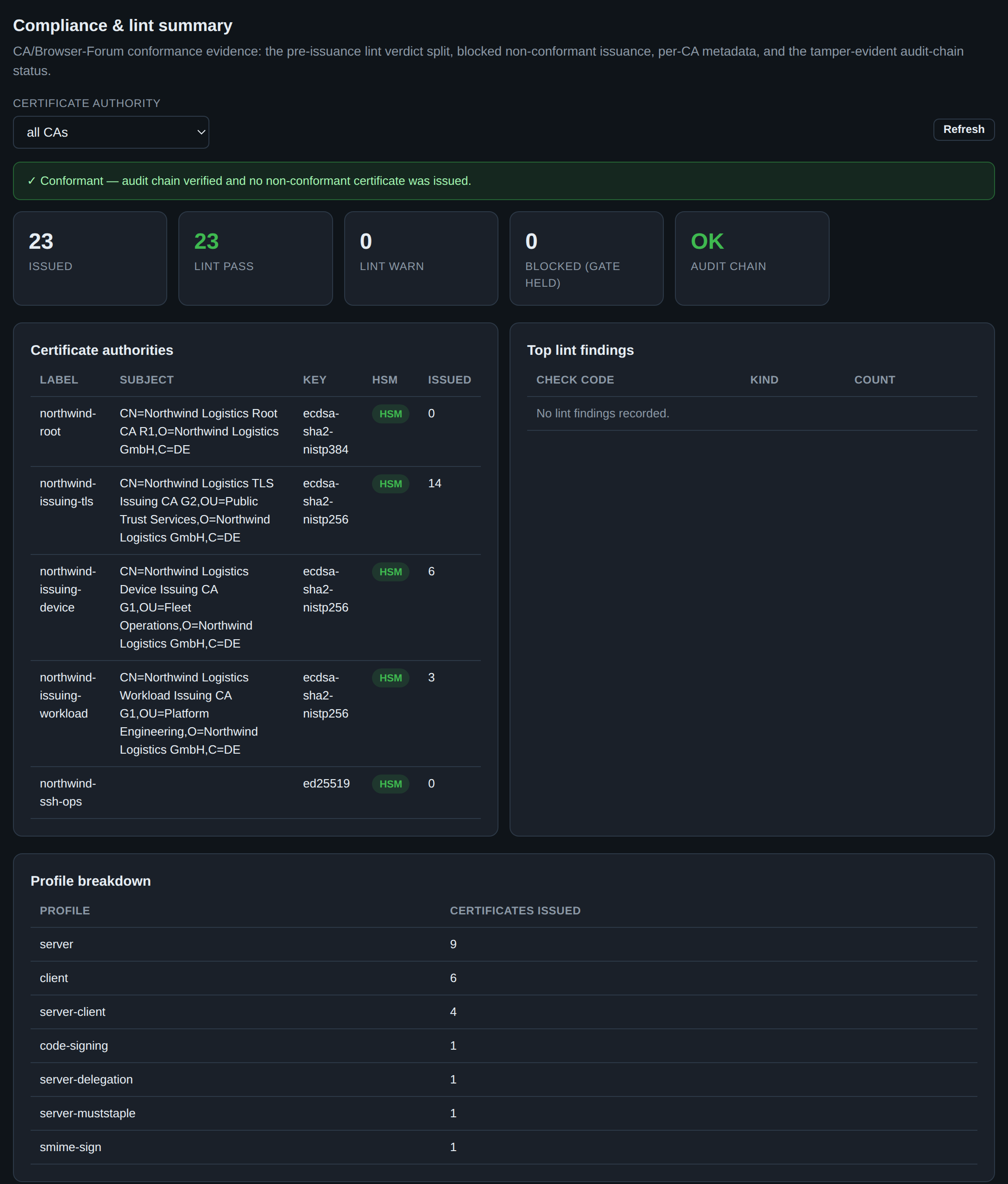
This page exists to be read by someone who is not you: an auditor, a security review, a customer questionnaire. It states a single claim at the top — conformant — and then shows the evidence behind it.
The tiles are the argument. Issued and lint pass should be equal; lint warn counts certificates that were issued despite a lint finding; blocked (gate held) counts requests the pre-issuance gates refused, which is a number you want to be non-zero over time, because zero means either perfect inputs or a gate that is not actually enforcing. Audit chain OK is the same verification as the Audit page, restated as a compliance control.
The per-CA table carries an HSM badge per CA — the claim that this CA's key is on a hardware token rather than in a file, which is the single most-asked question in any CA audit. The profile breakdown shows what the deployment is actually used for, which is often different from what its owners believe.
The mapping from these controls to the CA/Browser Forum Baseline Requirements and the RFC 3647 CP/CPS structure is in the compliance control mapping.
21. Day-2 diagnostics
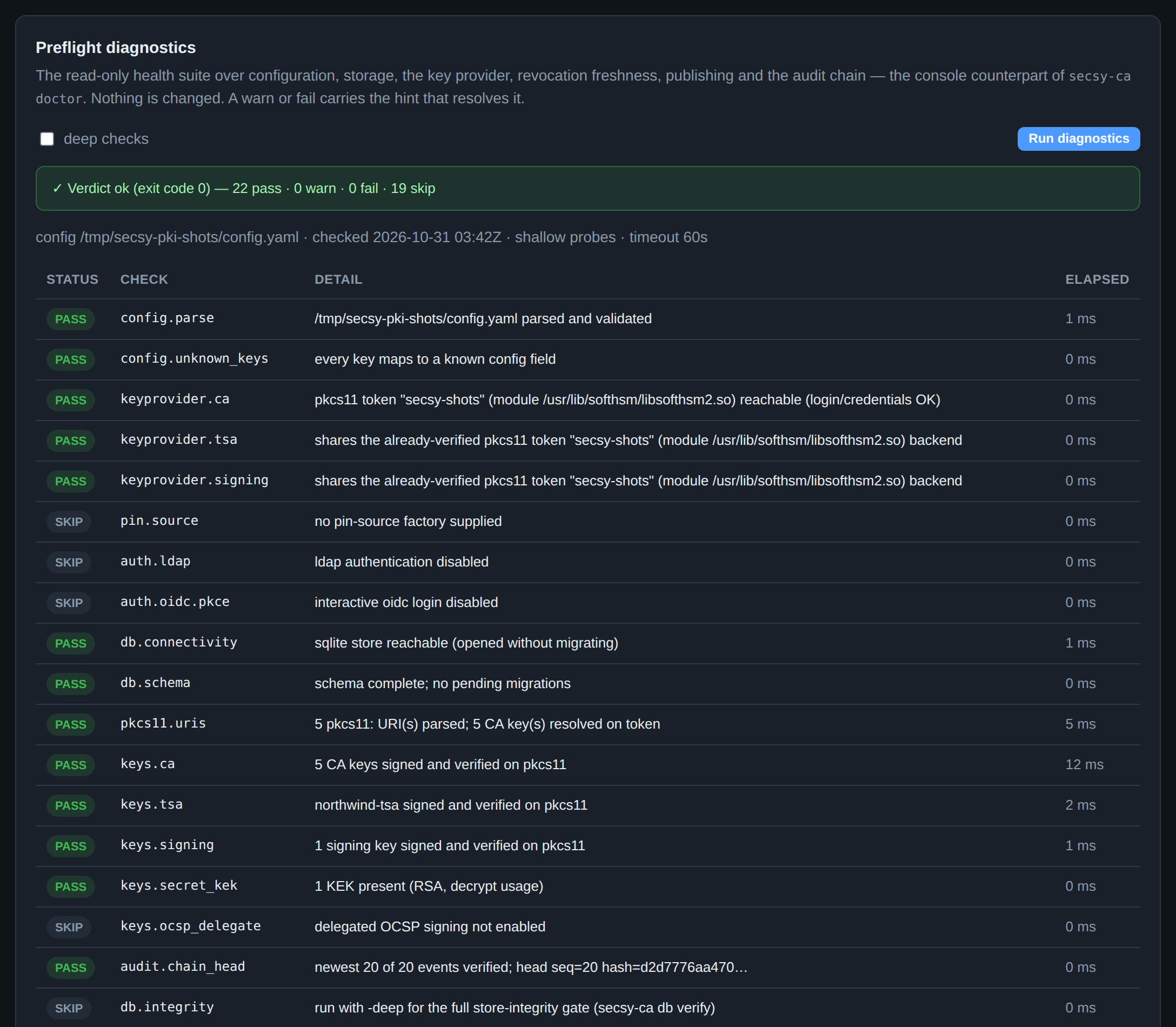
Operations is the console half of secsy-ca doctor: a read-only sweep over
configuration, storage, the key provider, revocation freshness, publishing and
the audit chain. It changes nothing, and the verdict carries the CLI's exit code
so the same check can gate a deployment.
It is worth running at three moments: after a config change, before a release,
and first thing when something is wrong — because it checks the boring layers
underneath the symptom. keyprovider.ca proves the token is reachable and the
PIN is accepted; keys.ca goes further and actually signs and verifies with
each CA key; audit.chain_head verifies the chain; certs.ca_expiry reports
the tightest headroom any CA has left. A warn or fail carries the hint that
resolves it rather than only the finding.
SKIP is not a failure — auth.ldap skips because LDAP is not configured — and
deep checks adds the slower gates (a full store-integrity pass) that are not
worth running on every click.
The rest of the page covers the disaster-recovery manifest, the restore drill and static-artifact publishing; all three are described in the operator runbook.
This page used to disturb the key provider (fixed)
Through the 1.0 release, loading this page could take the server's HSM keys
away until it was restarted: the HSM key inventory reported zero keys and
secret decryption failed with CKR_OBJECT_HANDLE_INVALID. GET
/api/doctor builds a second PKCS#11 provider for the sweep and closes it
at the end, and that teardown — C_Logout, C_Finalize, dlclose — is
process-global rather than per-handle, so it deauthenticated and then
finalized the module out from under the serving session pool. The token
was healthy throughout, which is what made it look like an HSM fault.
Both the module and the login are now reference-counted across every holder
in the process (internal/pki/pool.go), so a diagnostic sweep logs out and
finalizes only if nothing else is using the token. If you are running an
older build, prefer secsy-ca doctor from a terminal: it runs in its own
process and cannot reach the server's sessions.
22. What is actually on the token
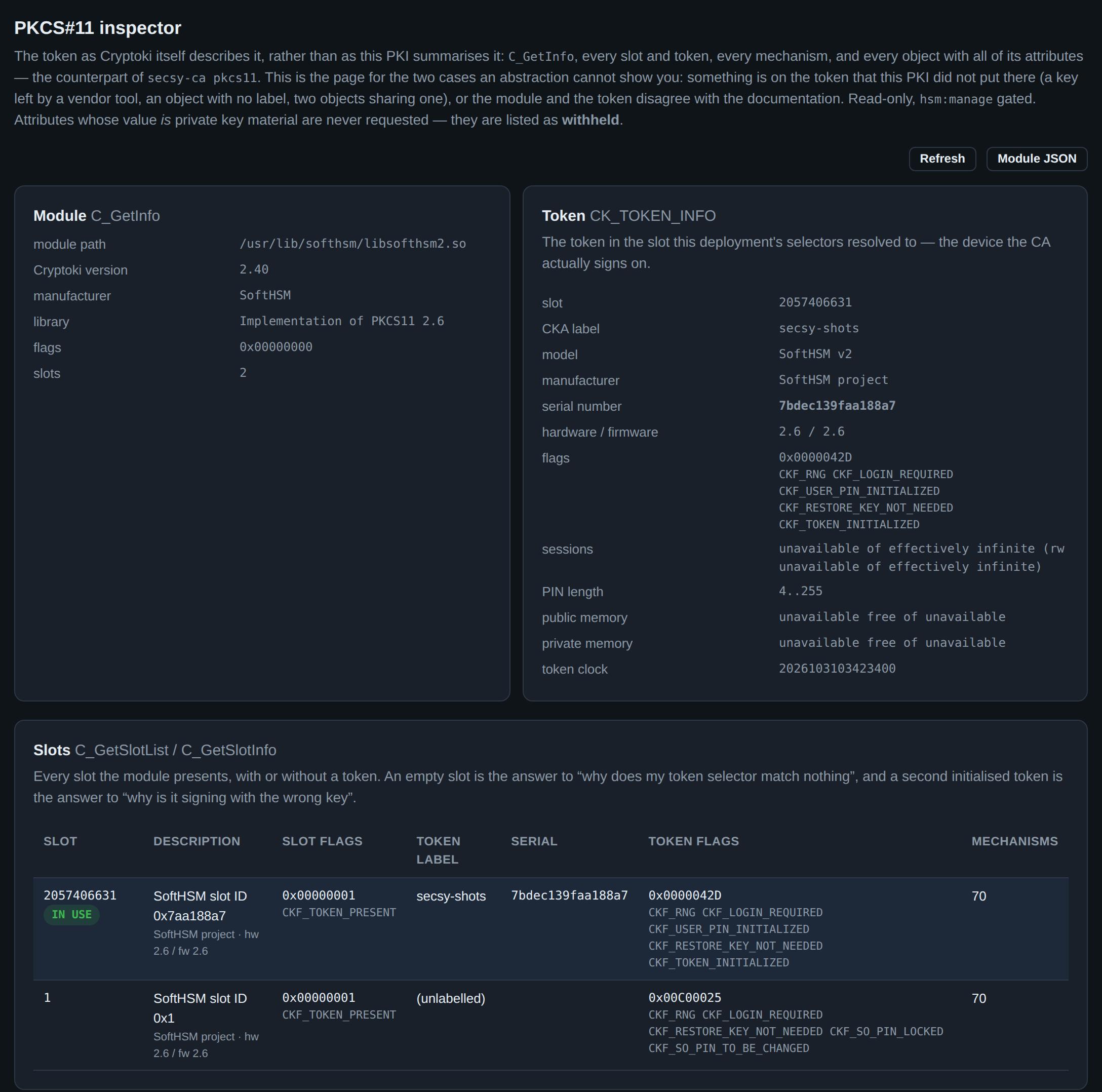
Section 3 asked the key provider what it holds. PKCS#11 asks the token, in
Cryptoki's own words: C_GetInfo, every slot the module presents, the
CK_TOKEN_INFO of the one this deployment resolved to, the mechanism list, and
every object on it.
The two views answer different questions, and the difference is the point of this page. The key inventory lists the keys this PKI knows about. This lists everything there is — including the second slot above, whose token is unlabelled and whose SO PIN is locked, which no inventory would ever have mentioned. That is what you need when a token selector matches nothing, when a key appears that nobody provisioned, or when the module turns out not to offer a mechanism the configuration assumes.
The module half opens no session and performs no login, deliberately: an operator reaching for a slot list is very often one whose login does not work.
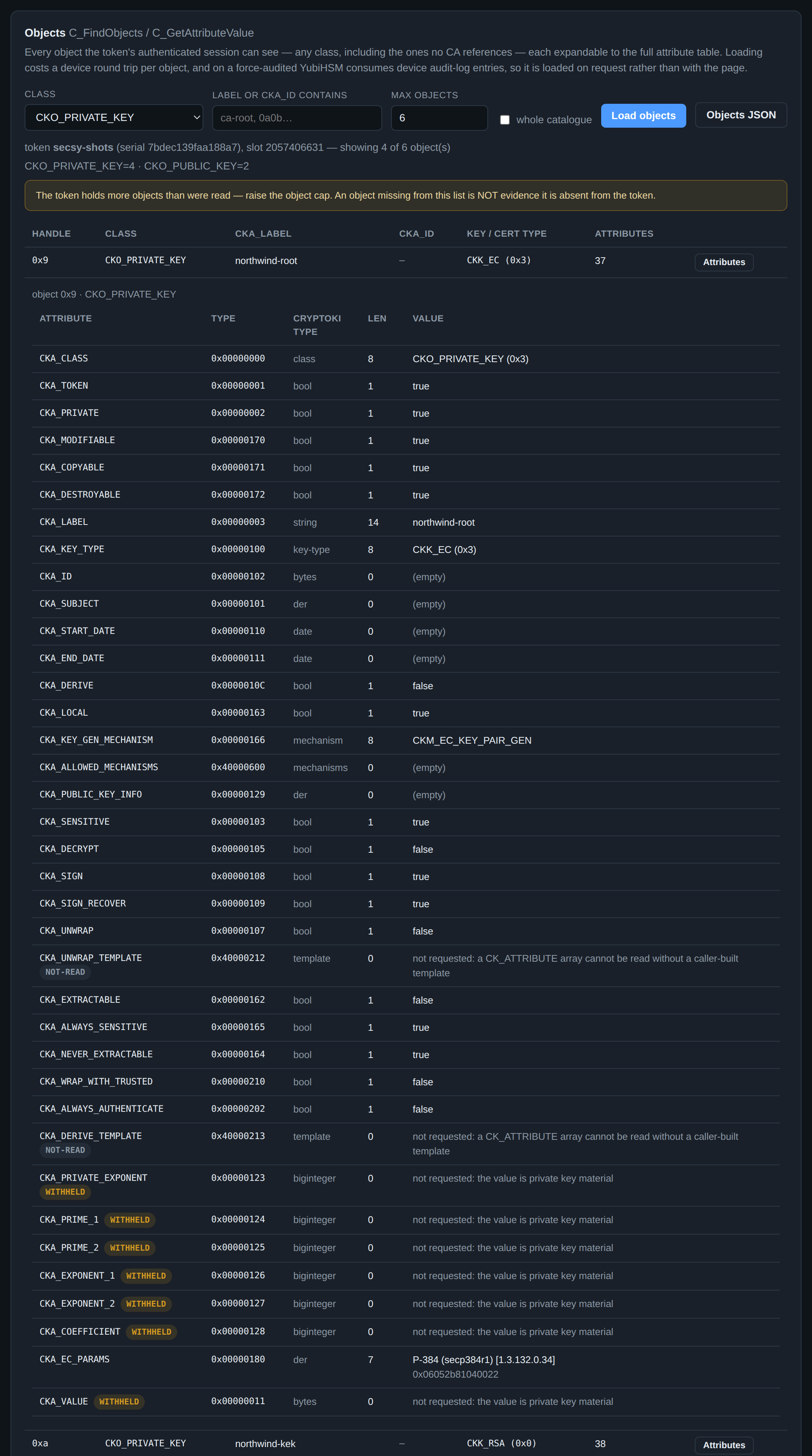
Objects loads on a click rather than with the page, because it costs a
device round trip per object — and, on a
force-audited YubiHSM, entries in the device's own log.
Each row expands to the full attribute table, with every value decoded by its
Cryptoki type: a curve OID becomes P-384 (secp384r1), a certificate's
CKA_VALUE becomes its subject and expiry, a modulus its bit length.
Two kinds of row carry no value, and both are deliberate. WITHHELD marks
an attribute whose value is private key material: the inspector does not ask
for it. A correctly provisioned token would refuse anyway — and that refusal,
CKR_ATTRIBUTE_SENSITIVE, is reported when it happens — but this page must not
be the one path in the system that turns a mis-provisioned extractable key into
a browser response. NOT-READ marks the CK_ATTRIBUTE-array attributes,
which cannot be read without a caller-built template.
What this page is not is proof. CKA_EXTRACTABLE=false is the module's
answer over a session; the device-signed version of the same claim is
key attestation, one tab to the left. Use PKCS#11
to see what is there, and attestation to prove what it is. The full reference is
the raw PKCS#11 inspector.
Where to go next
- The web console reference — the same UI as a reference: every page, including the ones this walk skipped (ACME, CT inclusion, discovery, PKCS#12, approvals, tenants, DNS records, webhooks), and the endpoints behind each.
- CLI ↔ console parity matrix — every page above
against the
secsy-cacommand that does the same thing, and the commands that stay deliberately on the command line. - Operator runbook — the procedures this page only points at: CA key compromise, OCSP/CRL outages, rotation and the DR drill.
- HSM configuration — what sits behind section 3, and how to move from SoftHSM to real hardware.
- RBAC and audit — the role model the whole console is gated by.
↩ Back to day-2 operations · documentation map